New research. New announcements. A new chapter for GitLab.
On June 10, GitLab Transcend streams live from London — and engineers get a first look at GitLab 19 and Duo Agent Platform advancements before anyone else.
Including a live demo of GitLab Orbit: a knowledge graph across your entire SDLC so your agents know your pipelines, your security backlog, and what shipped last week. Not just your repo.
Virtual, free, and just days away.
OpenAI’s data platform stores 1.5 exabytes across 90,000 datasets and serves ~4,000 internal users as of May 2026. The team has scaled the platform through enormous growth in the last two years. At this scale, the hardest part of data analysis isn’t writing SQL. It’s finding the right tables to use in the first place and understanding semantically how to use data. Many tables look similar but mean different things. What’s the grain of each table? How do you join them against other data? Analysts can spend hours figuring out which tables to use and how to use them before writing a single line of code.
Last year, OpenAI’s data platform team built an in-house agent to fix that. The agent is, in their own words, “pretty vanilla”, yet it works reliably across the entire ecosystem. And the same investment in Codex that powers the agent has let the team do things most companies consider impossible, like migrating thousands of DAGs, 90,000 tables and 600 petabytes between clouds in two months.
We spoke with Emma Tang, Head of Data Platform Engineering at OpenAI, about how the agent works, why a simple architecture is enough at this scale due to strong data infrastructure foundations, the lessons for other teams, and where the platform is headed next. Thanks to Emma for taking the time to share the team’s work in detail.
In this article, you’ll learn:
The architecture behind OpenAI’s data agent, and why “vanilla” is the point.
The six layers of context that turn a single LLM into a reliable analyst across 90,000 tables.
How a question becomes a verified answer in three steps.
Three real Codex use cases inside OpenAI: a 10,000 DAG, 90,000-table cross-cloud migration, hands-off open-source patching, and automated support triage.
Five practical lessons for any team building a domain agent, and where OpenAI’s data platform is headed next.
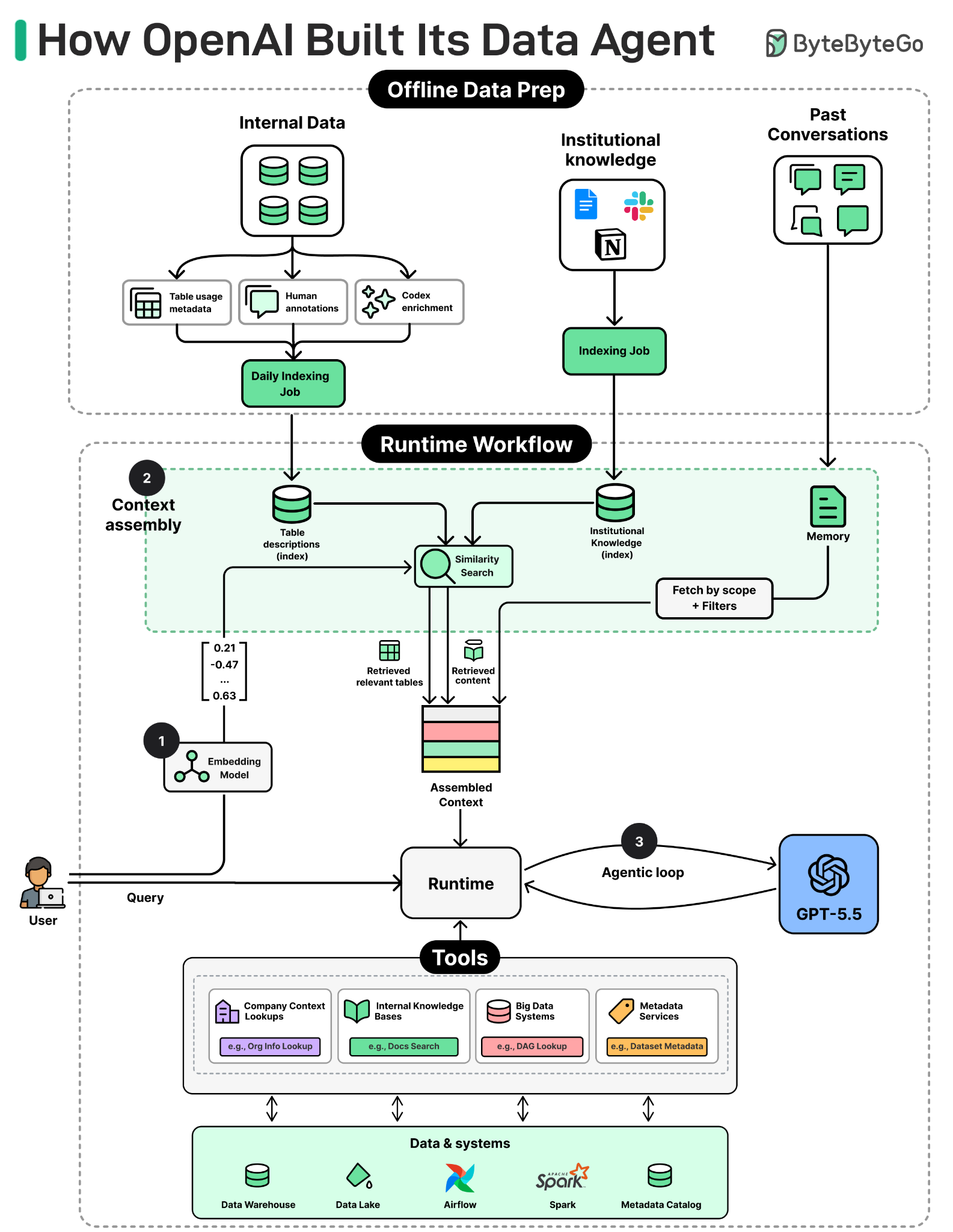
To understand the agent, we will look at three things: what users experience when they ask a question, what architecture supports that experience, and how a request moves through the agent until it returns a verified answer.
Imagine an engineer or marketer at OpenAI who needs a quick answer. They open Slack and ask their questions in plain English. Moments later, the agent replies with its answer, the SQL it ran, and the tables it pulled from. That’s OpenAI’s data agent.
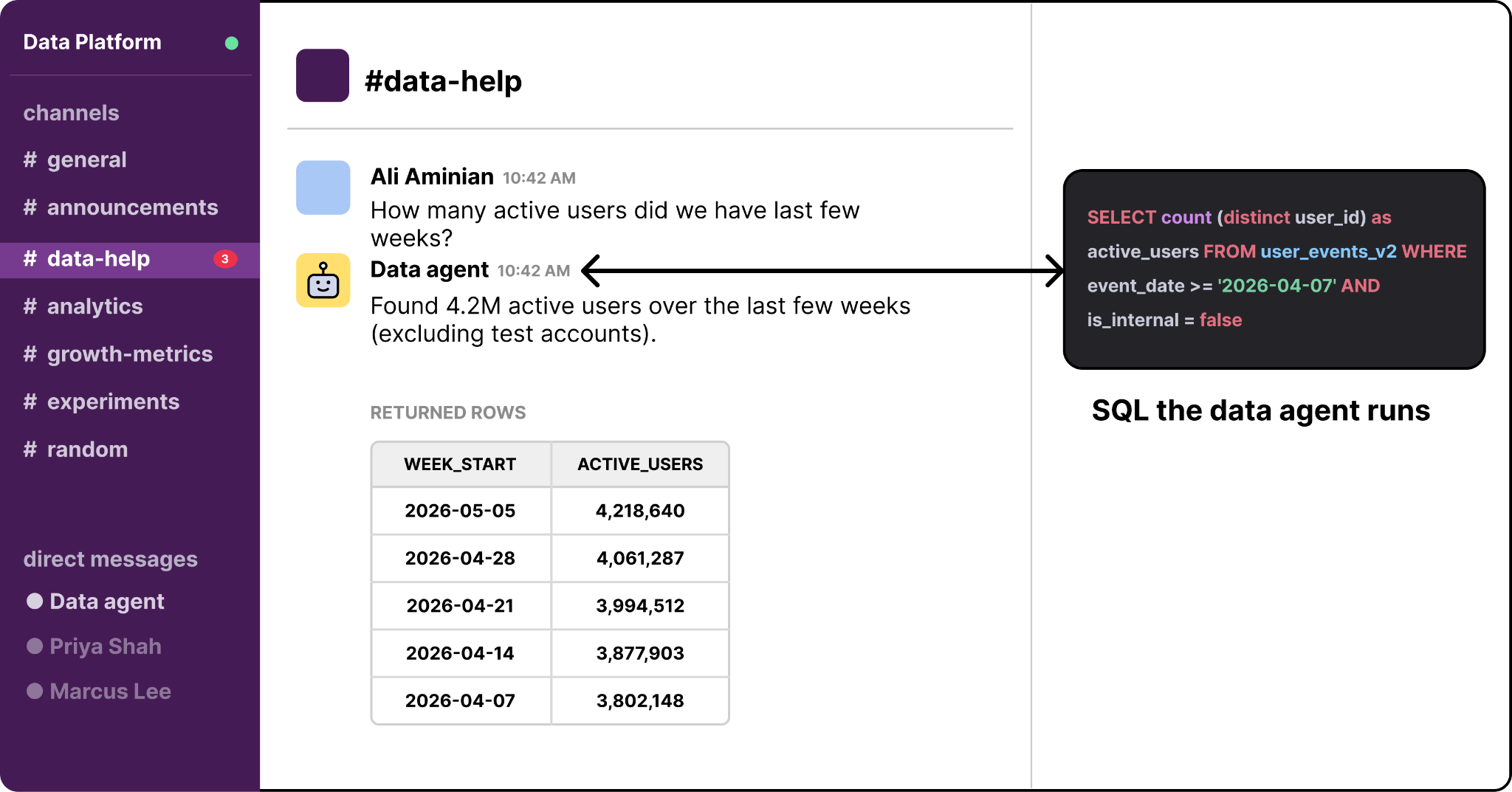
The agent sits across the entire data platform and answers questions in natural language. A user can ask in Slack, in a web portal, in their IDE, or in the Codex CLI through MCP. The agent figures out which tables are relevant, writes SQL, runs it, checks the result, and returns the answer with its reasoning attached.
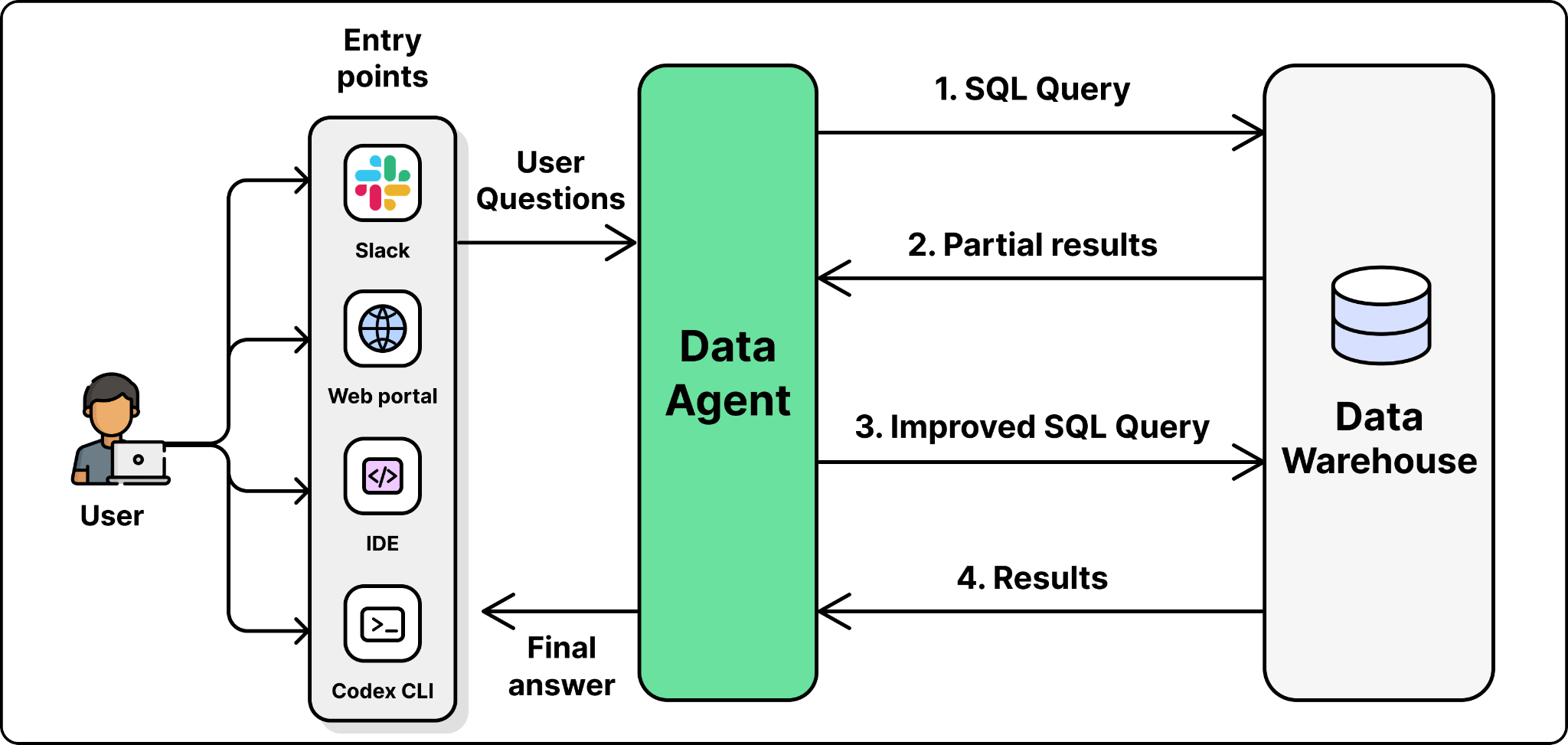
Doing all of this reliably across 90,000 tables sounds like it would need a complex system. The team’s approach is the opposite of what most people expect. The agent itself is simple. The reliability comes from the engineering around it: careful data acquisition that gives the agent the right context before it ever sees a question. The next sections look at how the agent is built to get that context right.
OpenAI’s architecture is intentionally simple. Before diving deeper into the architecture, it helps to first understand the basic patterns behind agentic systems.
The basic pattern behind the data agent is an LLM plus a harness. The LLM provides the reasoning. The harness provides the tools and the agentic loop that turns reasoning into action.
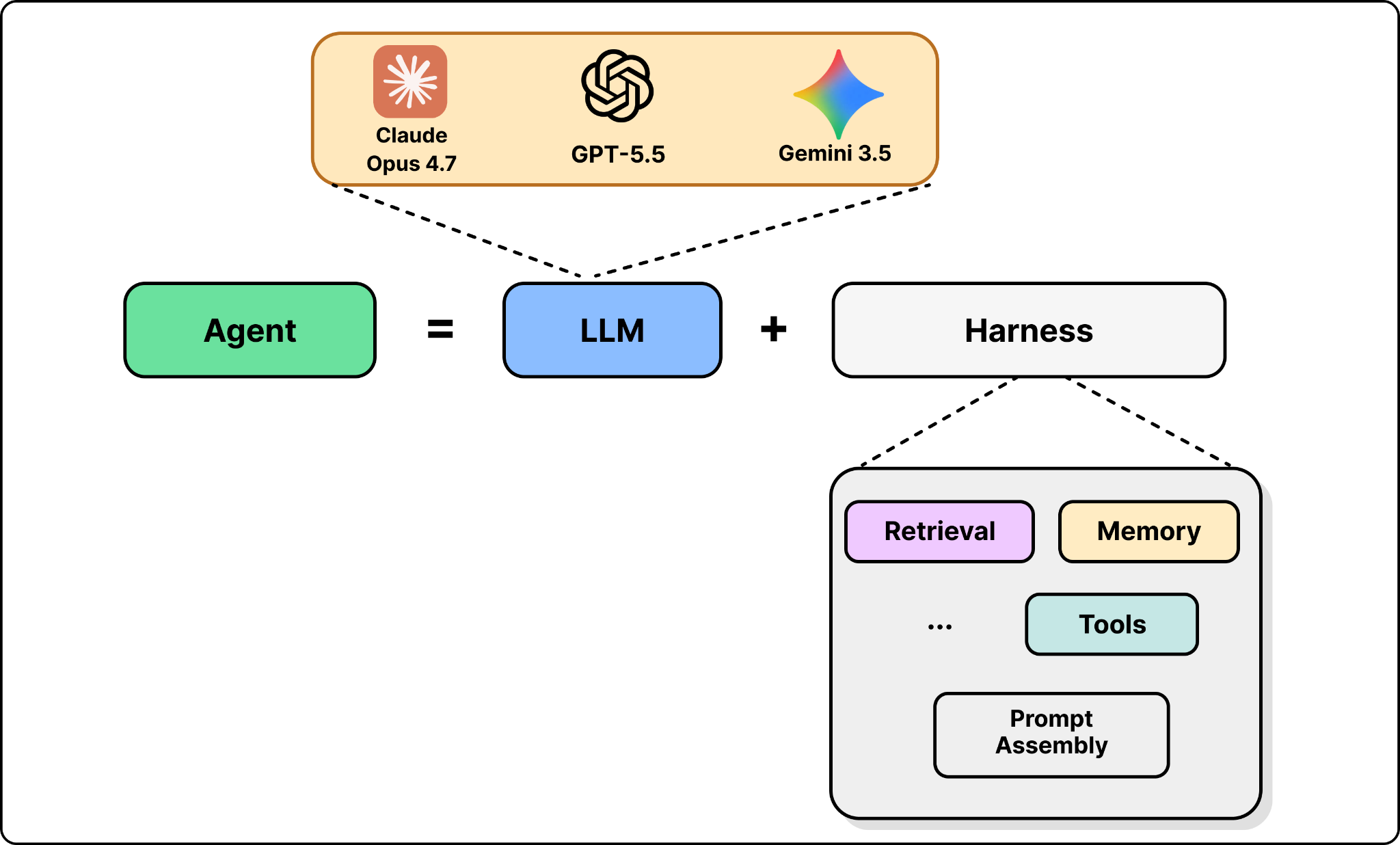
The reason you need a harness is that an LLM by itself can only predict the next token. It knows a lot, but it cannot run a SQL query or act on the result. The harness fills that gap. It gives the model tools it can call, like a database query interface, assembles relevant context, and runs the model in a loop so it can reason, act, observe the result, and act again until the task is done.
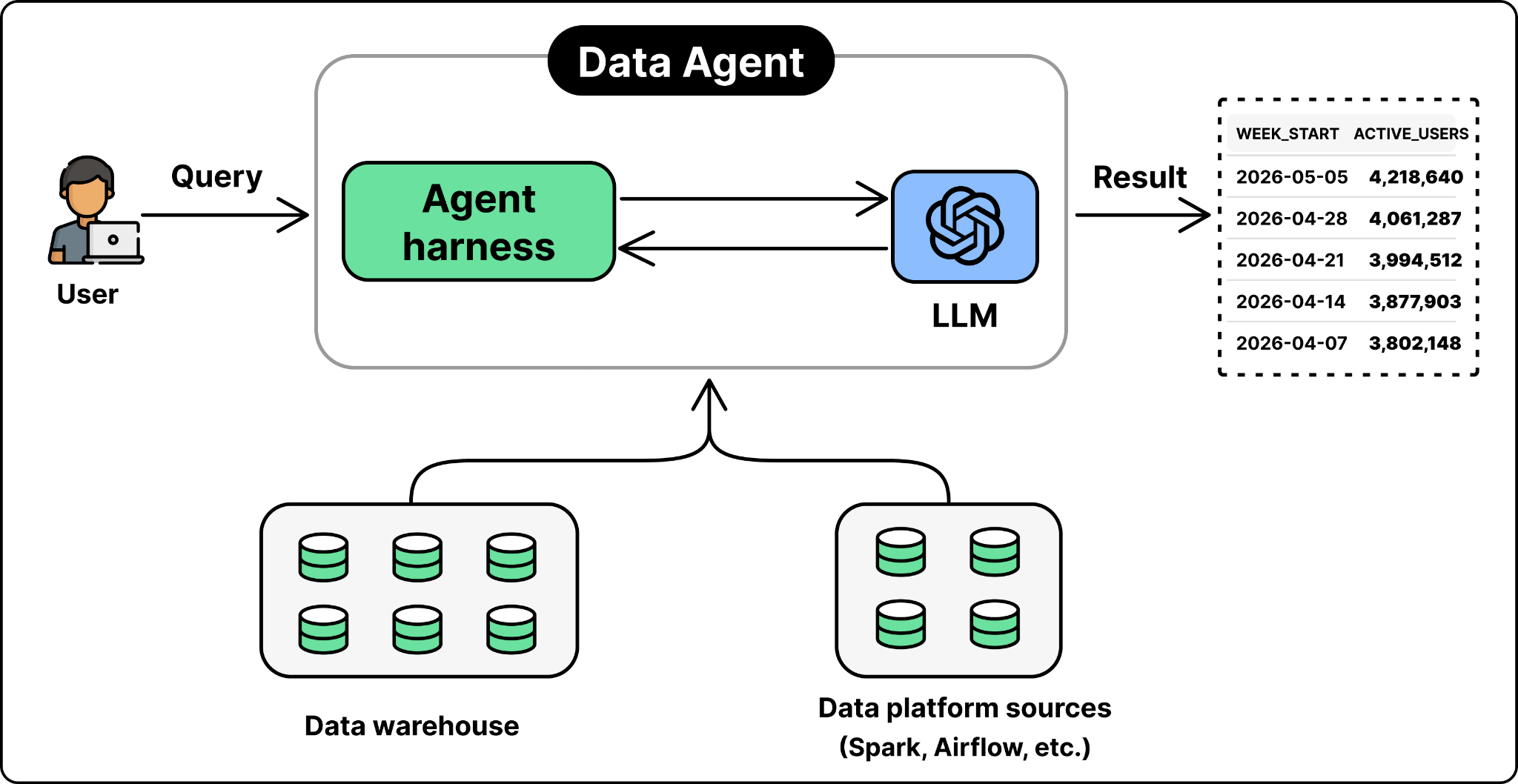
Many agent systems become complicated at this point as shown in the figure below. A team might add a router that sends easy questions to a small, cheap model and hard ones to a larger model. It might mix multiple LLMs, fine-tune models on internal data, or build complex retrieval pipelines with different embedding models for different content types. Each choice can help, but each also adds cost, latency, and more ways for the system to fail.
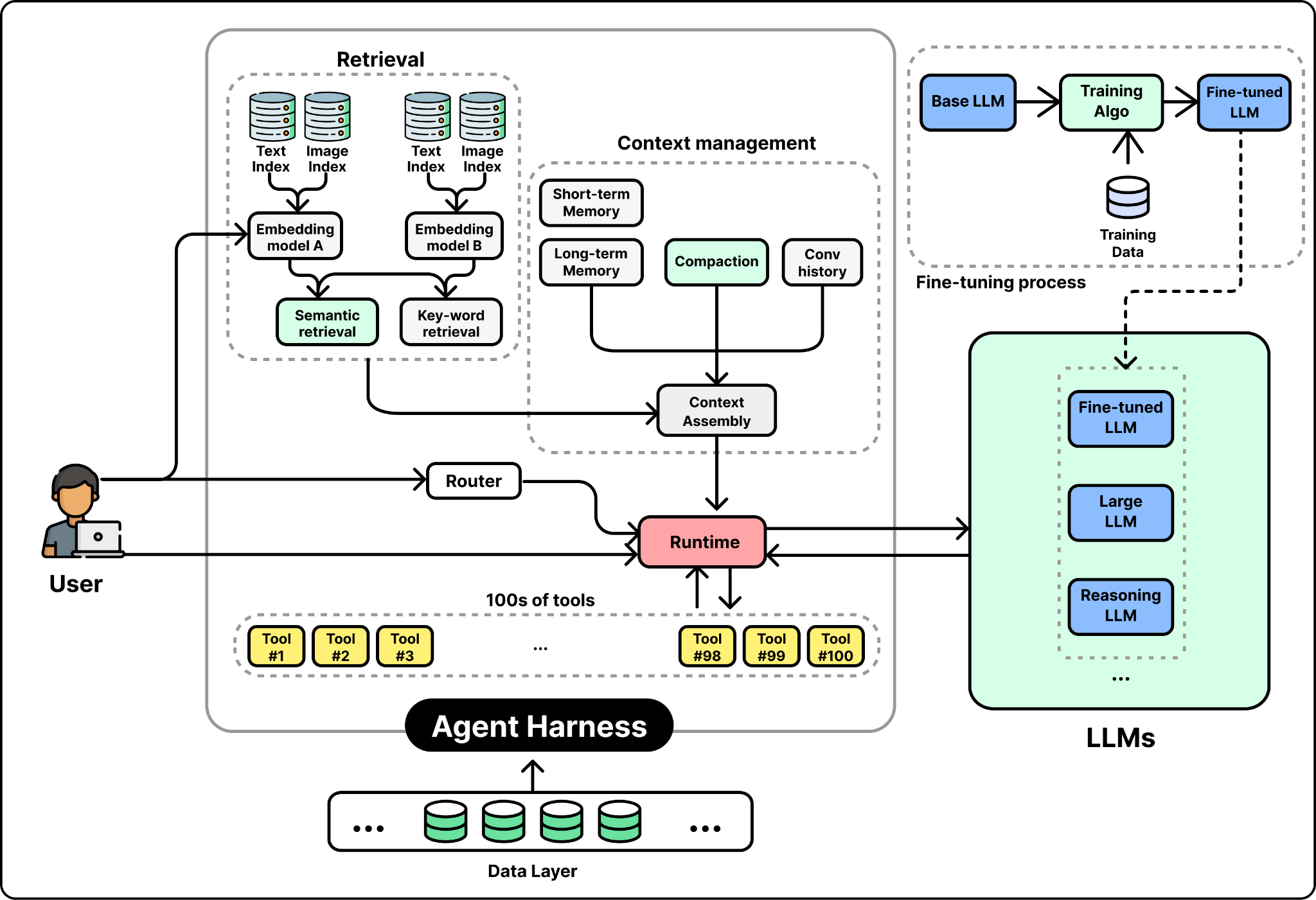
OpenAI’s data team took a different approach. They found that a simple architecture works well at their scale, backed by their robust and unified data platform foundation. The data agent they developed consists of four main components: a single LLM, a context assembly layer, a carefully curated set of tools, and an agent runtime.
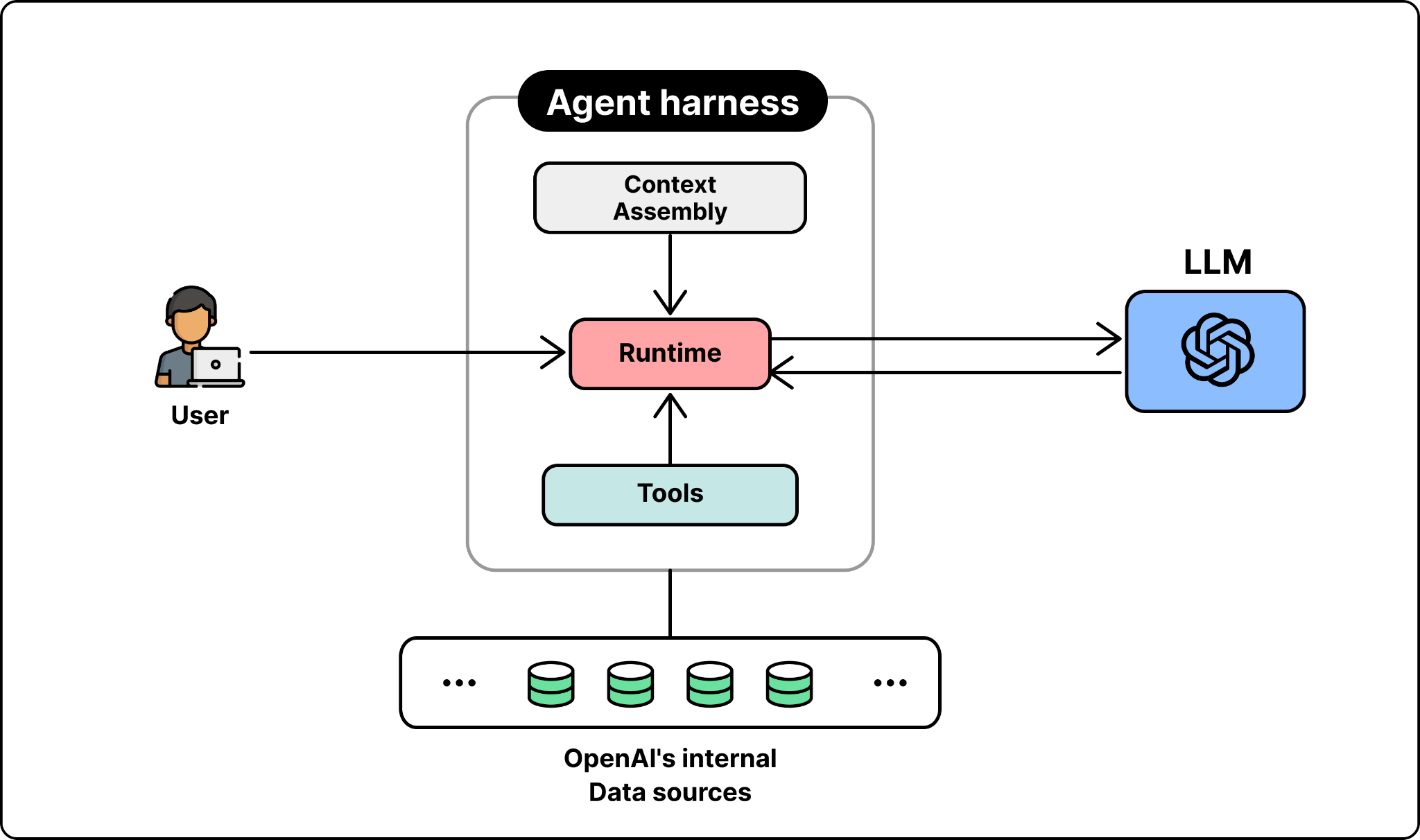
LLM. The data agent uses GPT-5.5 as the foundation model for every request. The team relies on the model to produce the right SQL queries, inspect the results, correct the queries, and reason its way to a verified answer.
Runtime. The runtime is the orchestrator that drives each request. An LLM on its own only emits text, so something has to act on what it produces. The runtime parses the model’s output, dispatches the requested calls to tools, feeds the results back into the model, and repeats this loop so the model can reason, act, observe, and act again until the task is done.
Context Assembly. This is where the real engineering work lives. A strong model still produces wrong answers without the right context. A bare schema is not enough to tell tables apart. For example, two tables may both have a user_id column and look almost identical, yet one includes logged-out users and the other does not. From the schema alone, the model cannot tell which table answers the question, and picks the wrong one.
To build a richer context, the team identified the signals that actually help the model decide which tables to use and what query to generate: a table’s schema and how people have queried it, notes from the people who own it, and what the pipeline code reveals about how it is built.
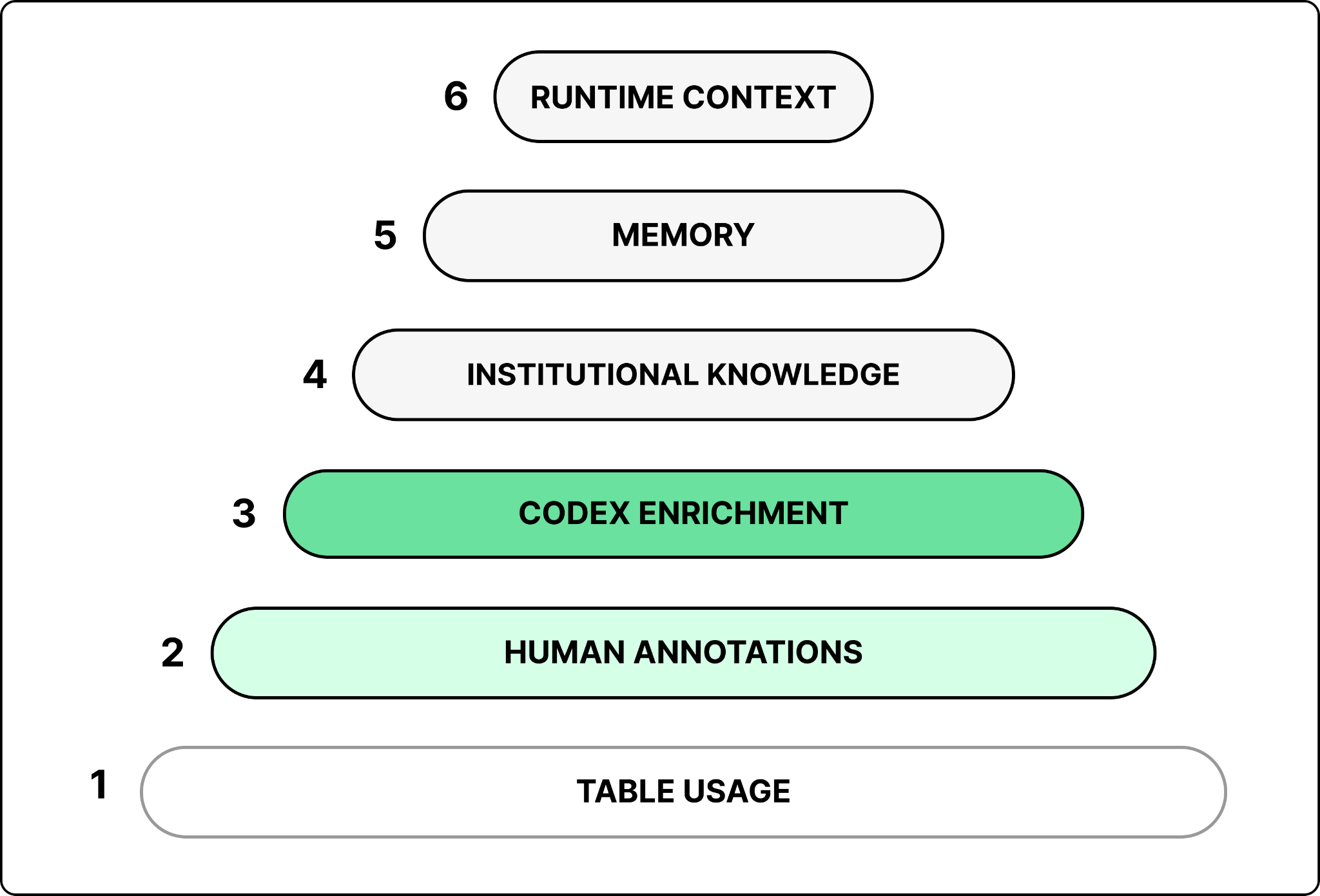
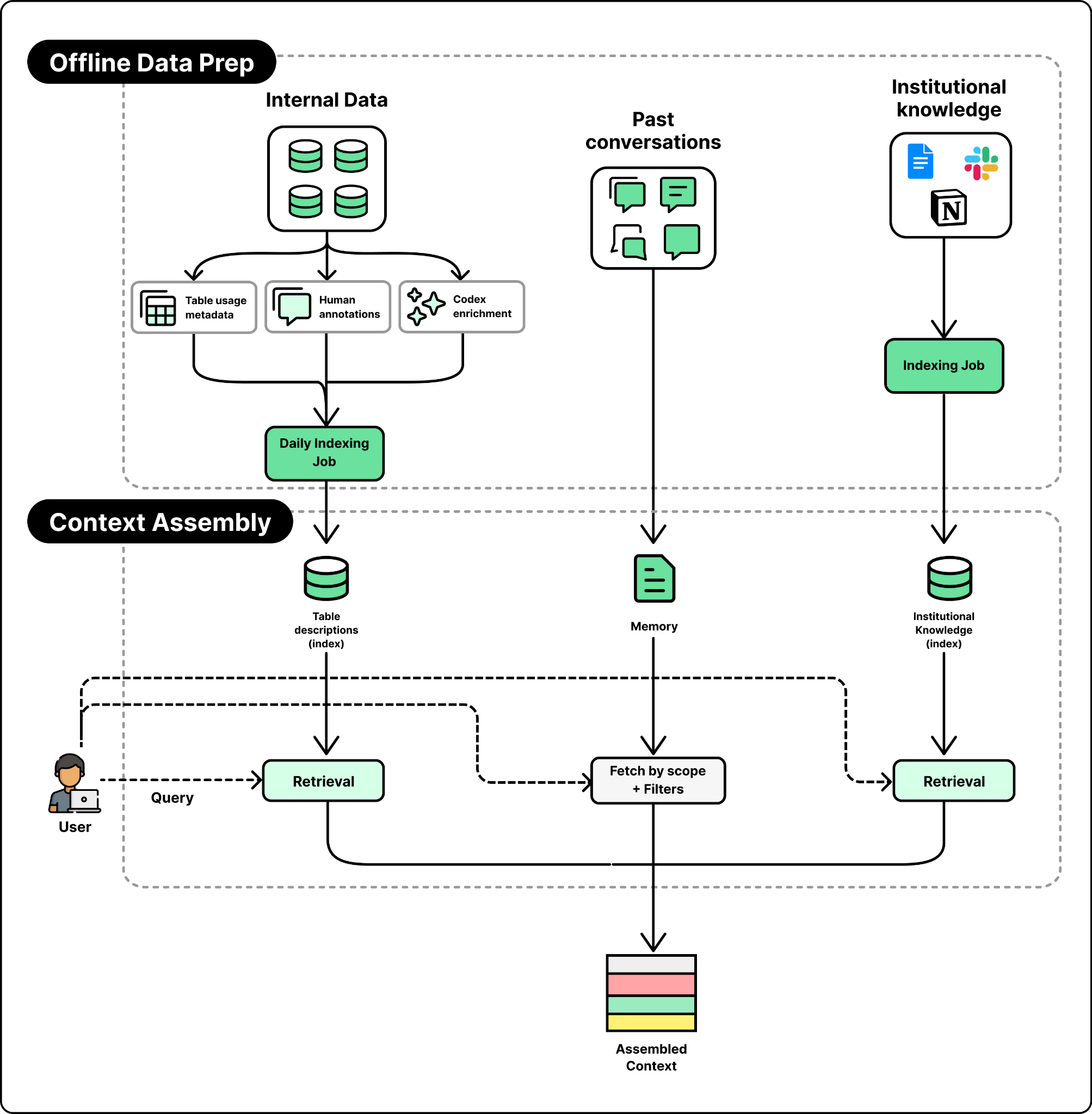
Building on these signals, the agent relies on six layers to assemble the right context when a user query arrives:
Table usage metadata. The table’s schema, its lineage, and a history of how people have queried it. Not all queries are equally useful. Queries from popular dashboards written by data scientists rank highest because they tend to be correct and reusable. One-off, exploratory queries rank lower.
Human annotations. Curated descriptions written by table owners that capture business meaning, ownership, criticality, and known caveats that cannot be inferred from schemas or past queries.
Codex enrichment. A nightly Codex job crawls the pipeline code that produces each table. It runs in batches of 100 to 200 tables, with each table taking 5 to 10 minutes. By reading the code, it captures what a table actually contains, how it is derived, how fresh it is, and when to use it instead of a similar table.
Institutional knowledge. A lot of context about the company’s data lives outside the warehouse, in Slack threads, Google Docs, and Notion pages. These documents are ingested and embedded separately, and served through an access-controlled retrieval service, so the agent never surfaces documents a user is not allowed to see.
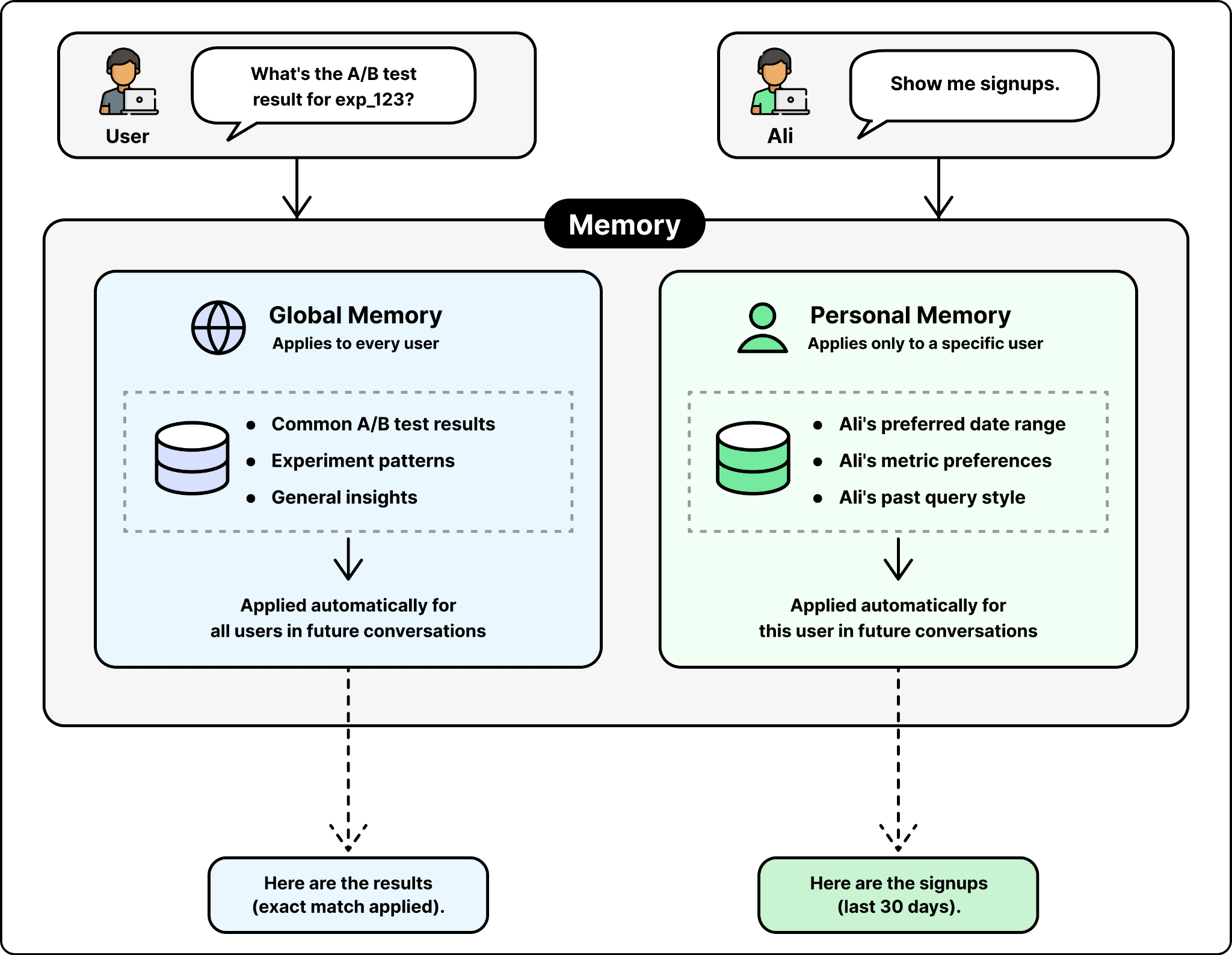
Memory. Corrections and learnings the agent has saved from prior conversations, scoped at global or personal level.
Runtime context. When the offline context is missing or stale, the agent queries the warehouse directly, and can also talk to other platform systems like Airflow and Spark to fill the gap.
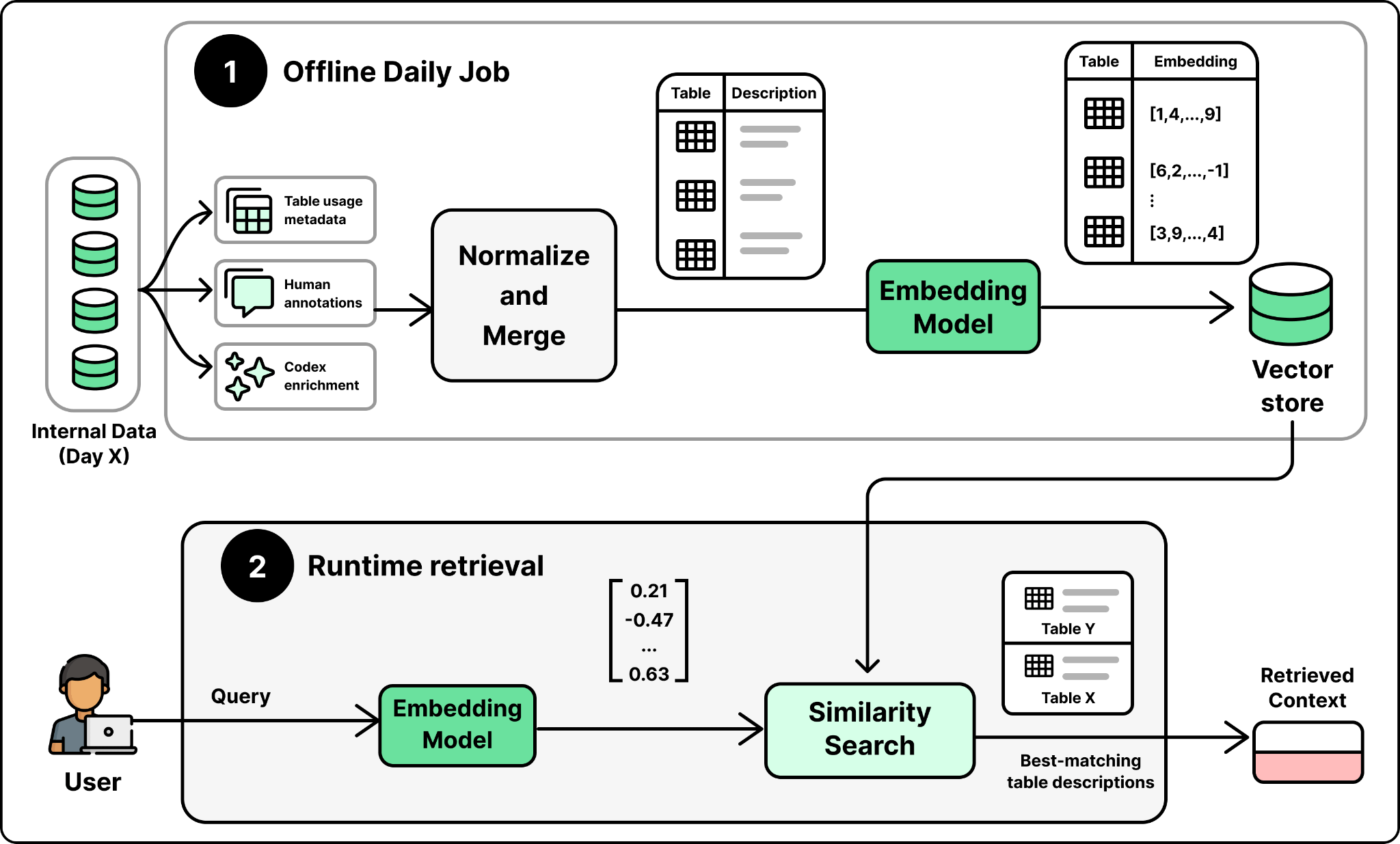
The first three layers, table usage metadata, human annotations, and Codex enrichment, are the ones that describe a table. A daily offline pipeline merges them into a single description per table, and an embedding model embeds that description into one vector per table, stored for retrieval. At runtime, when a question comes in, the tables whose descriptions best match the question are retrieved to be included in the context.
Memory is the other source to assemble the context from. It holds corrections and learnings saved from past conversations, applied on top of the retrieved descriptions so the agent starts from a more accurate baseline instead of repeating old mistakes.
The Figure above shows the overall design of context assembly. Retrieval over the table descriptions identifies the relevant tables, and relevant memory is pulled in as additional context. The last two layers fill the gaps the table store cannot. Institutional knowledge is embedded and retrieved through its own access-controlled service, and runtime context is pulled live from the warehouse when the offline description is missing or stale.
Tools. The agent has access to a small, curated set of 13 tools. These cover company context lookups, internal knowledge bases, big data systems like Airflow and Spark, and metadata services.
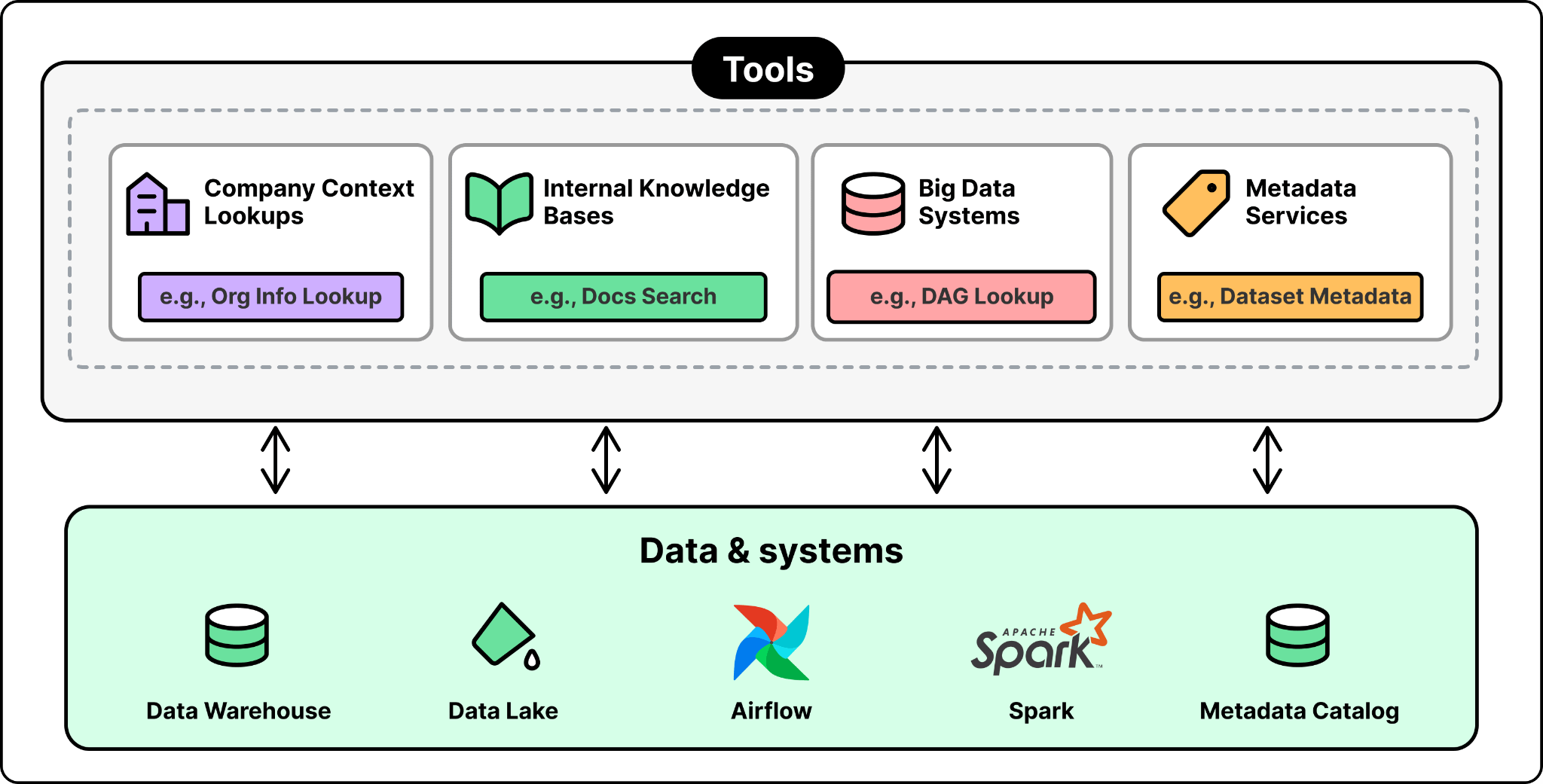
The agent uses them to fetch the information it needs to answer a question and verify its work.
The four components described above are the whole architecture of the data agent. There is no router, no fine-tuning, and no special post-training. Every question goes to the same model. According to Emma, the simplicity of the data agent is by design. The real engineering work happens at the infrastructure layer, which builds the right foundation for context assembly.
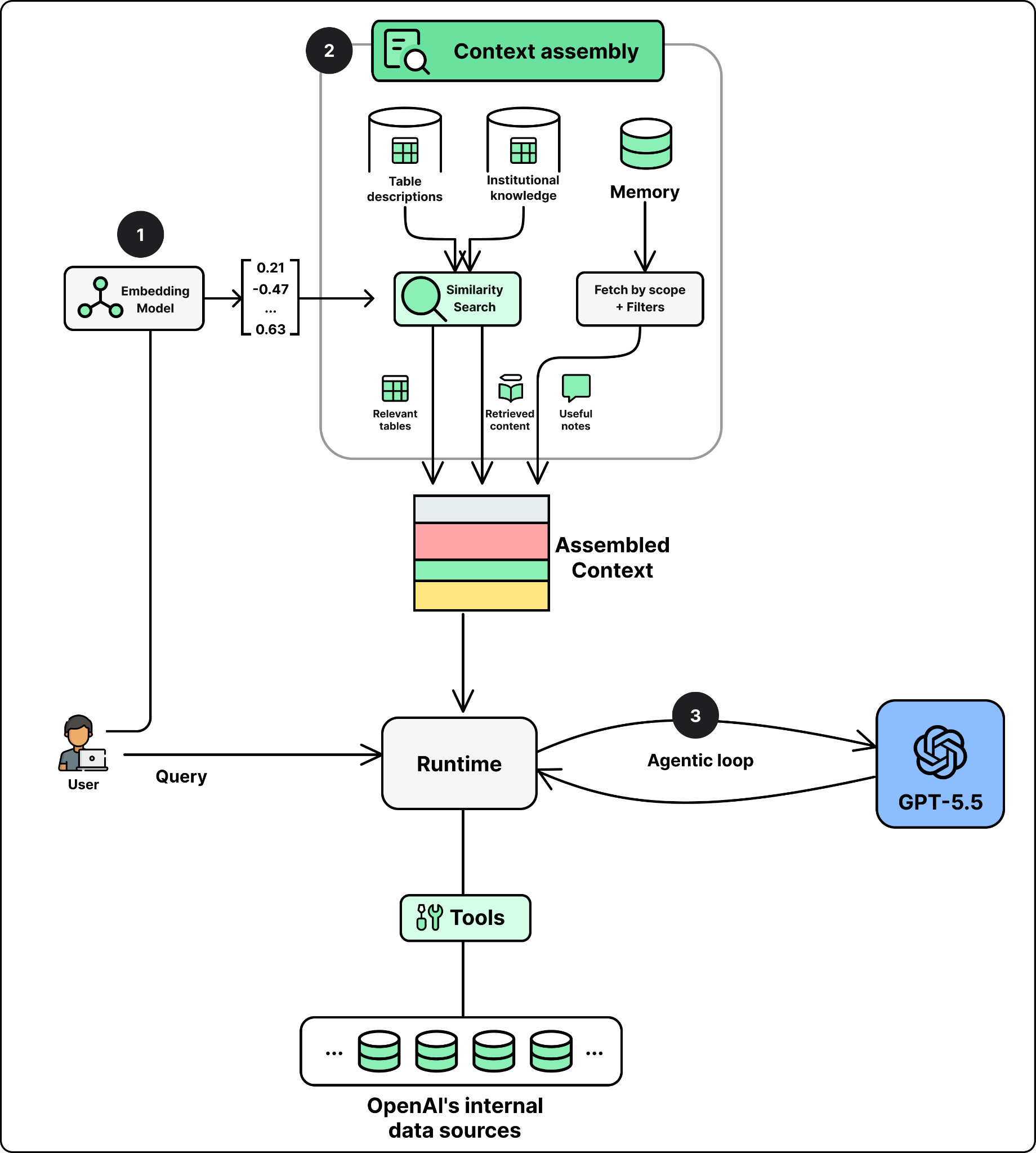
With the architecture in place, the next question is what happens when a user actually asks something. A question arrives in plain English. The agent’s job is to turn that question into the right context, run it, and return a verified answer. This happens in the following three steps.
Step 1: Embed the Question. The user’s question is converted into a vector using the same embedding model the team used to embed table descriptions offline. This vector is what the retrieval step searches against.
Step 2: Assemble the Context. The context assembly layer searches the vector store for the table descriptions that best match the question, combining semantic search with exact text matching. It also retrieves relevant institutional knowledge from its own access-controlled service, and adds any relevant memory to the context.
Step 3: Start the Agent Loop. The agent sends the assembled context to the LLM and puts it in a loop so it can write a SQL query, look at what comes back from the tool execution, and try again until the answer is correct.
That is the full flow. Three steps from question to verified answer. What makes the agent reliable is the quality of the context that flows through the three steps, which depends on the quality of the underlying infrastructure and how easy it is for the model to reason about. That comes from the six data layers prepared before any user asks a question. This is how the entire company can rely on the agent for critical workloads every day.
For other teams, the useful part of this story is that most components used to build the data agent are available to anyone. GPT-5.5 is on the API. OpenAI’s embedding API is public. Codex is public. MCP is an open protocol. The data platform team did not have access to anything a serious engineering team could not get. What they had was a unified, clean, and robust foundation, a carefully engineered context layer, and a willingness to keep the agent itself simple.
As pointed out in the previous section, the data platform uses Codex to read pipeline code each night, enriching the context the agent retrieves. That is one use case of Codex. But Codex supports many other use cases internally, helping run the platform itself.
Emma pointed out three interesting ones, different in scope but sharing the same pattern:
Migrating 10,000 DAGs, and 90,000 tables in two months
Releasing open-source patches without humans
Closing the support loop
OpenAI’s data platform was running out of capacity on one cloud provider. The team needed to move the data estate to a second cloud, fast. The migration involved 90,000 tables and 600 petabytes of data, plus hundreds of thousands of interdependent workloads.
The hard part of a migration at this scale is not moving the data. It is the dependency graph. Tables form a DAG. Table B depends on table A. Table C depends on table B. You cannot migrate in arbitrary order. During cutover, some tables live on the old cloud while their downstream consumers are already on the new one. At any point during the cutover, the team must know which copy of each table is the authoritative one, so dependent workloads do not read from a stale source. A system was built to replicate data across clouds in the correct direction while the migration is ongoing. This is for dependency graphs that are in the order of O(100k).
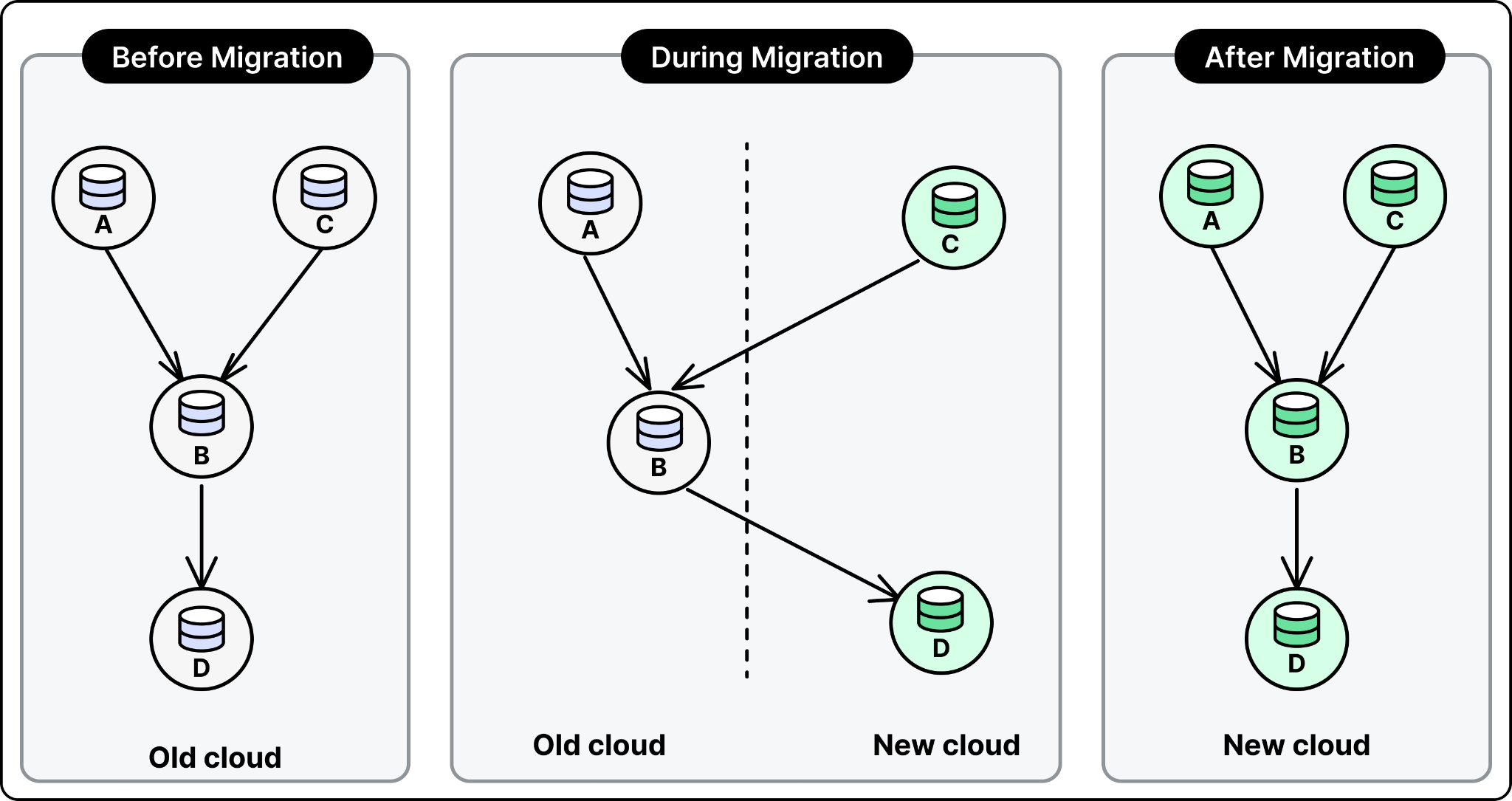
The migration touched hundreds of thousands of workloads, each needing a small code change to point at the new cloud. Filing that many pull requests by hand was not feasible, so Codex generated them instead. Codex Skills then handled the testing and validation for each PR. Around this, the team built a custom system to solve two hard problems: ordering the changes so dependencies migrated in the right sequence, and keeping data consistent while each workload ran against both the old and new cloud during cutover. That system gave Codex the guardrails it needed to operate safely at this scale.
With a strong team, and Codex doing much of the code changes, the migration finished end to end in roughly two months. Comparable cross-cloud migrations at other companies have run for years.
OpenAI’s data platform runs on more than a dozen open-source tools, including Spark, Kafka, and Flink. The team keeps its own version of each tool internally, modified with custom patches. Every time a new patch is added, it has to be tested against the existing test suites, validated on staging, and rolled to production.
This kind of work is critical for the platform’s reliability, but it is also repetitive and time-consuming. The test suites are long, with some taking hours and others running for days. An engineer used to babysit each release, watching the tests, diagnosing failures, and rolling the patch forward step by step. With more than a dozen forks, that work added up to a meaningful share of the team’s time.
The team turned the entire cycle over to Codex. A Codex-powered release agent validates patches against the test suites. It diagnoses failures and suggests fixes when something breaks. It rolls the patch all the way to production and alerts the team about what it did.
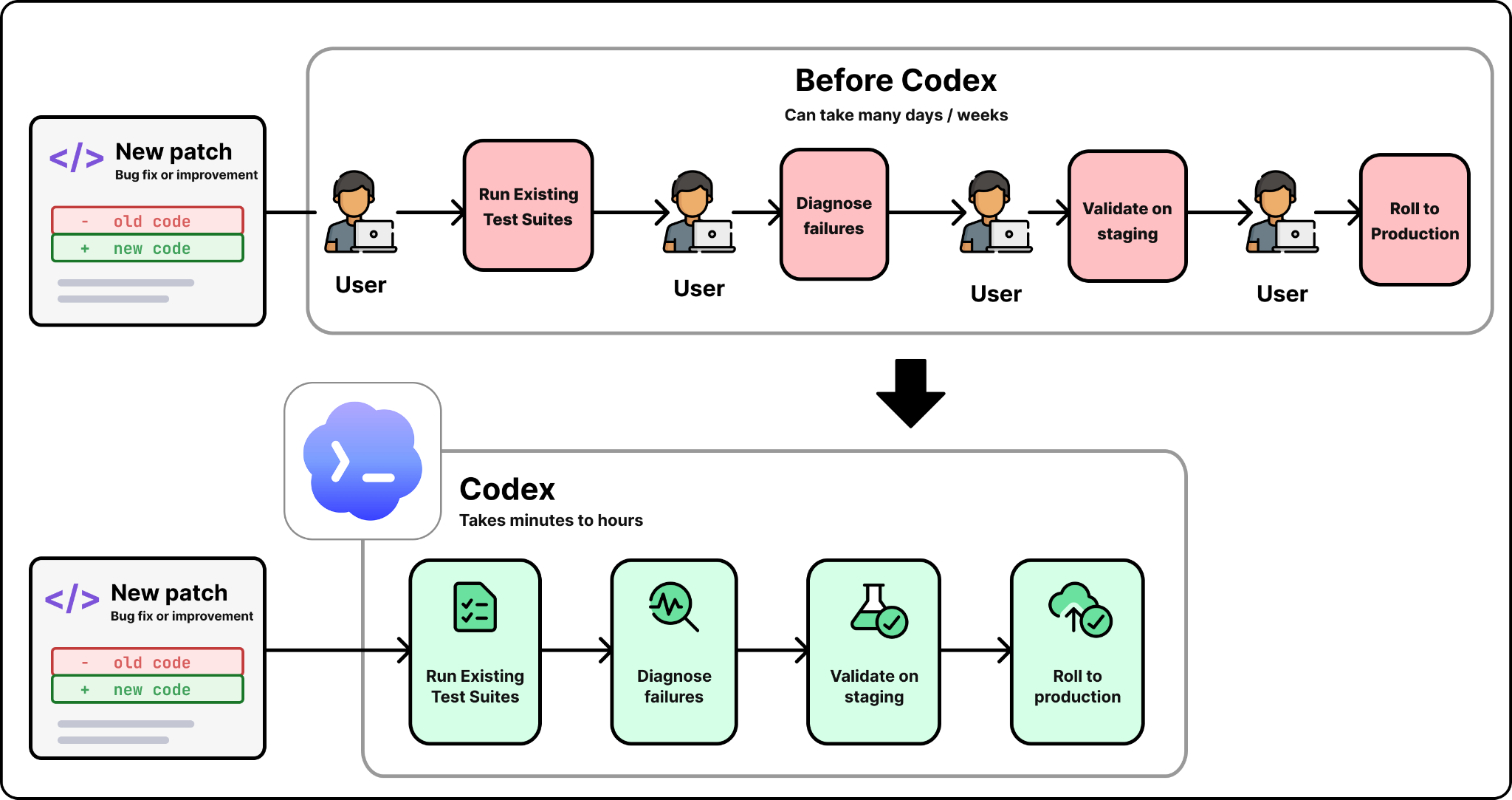
The release agent has now been running end to end for three to four months without human involvement and without a single incident. What used to require an engineer per release now runs unattended.
A platform that serves 5,500 internal users gets a steady stream of support questions. A pipeline fails. A dashboard breaks. A permission link does not work. Every one of these ends up with the platform team, and each one requires investigation before it can be fixed. At scale, that investigation work used to consume a meaningful share of senior engineering time.
Codex now handles the part of support that used to require investigation. A support bot fields the common questions first and resolves the easy ones directly. When the bot cannot resolve an issue, the engineer on call hands it off to Codex with minimal context. Codex investigates, finds the fix, and applies it. The engineer reviews and approves.
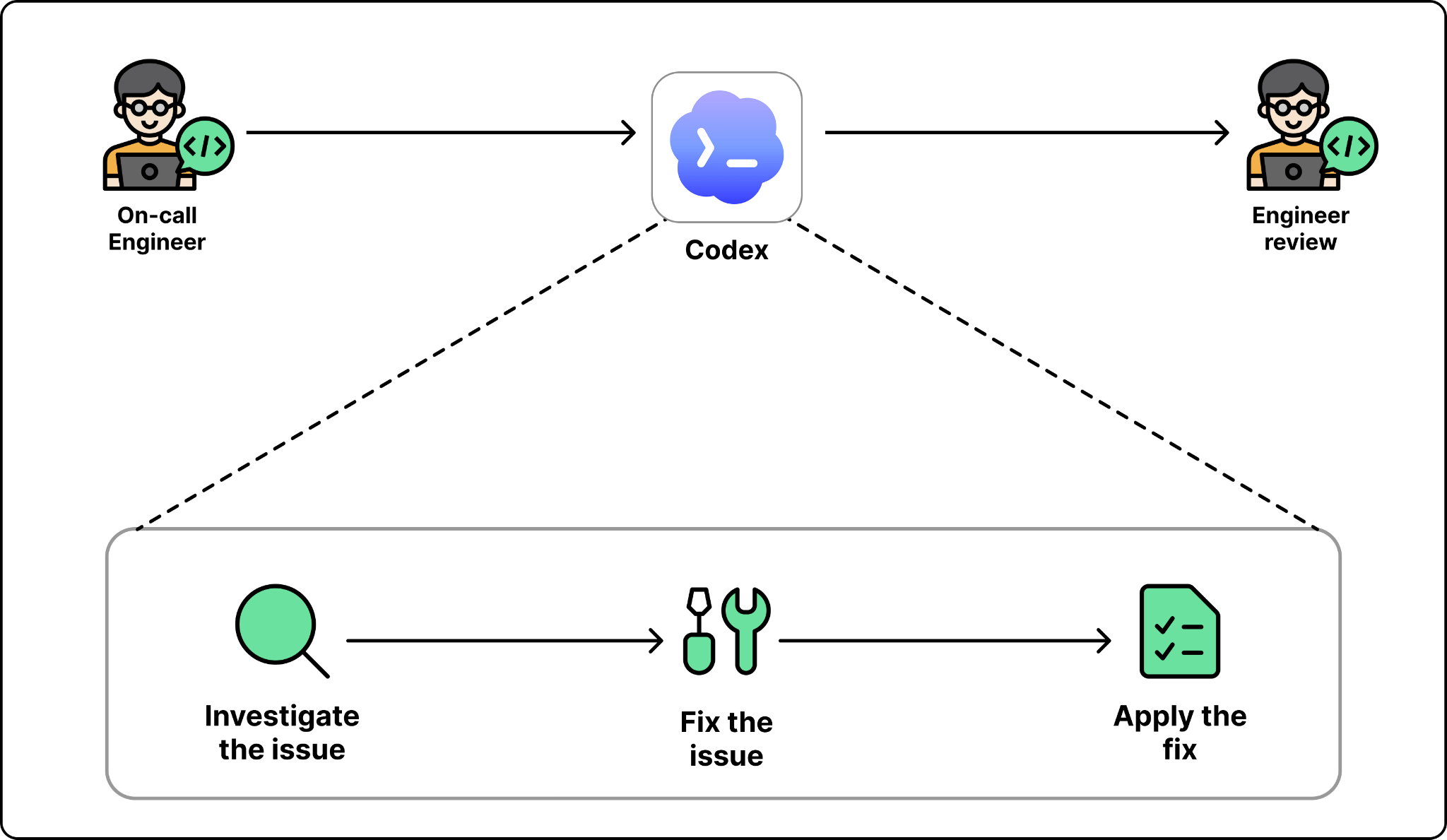
The loop that used to take an engineer a few hours per ticket now lets that engineer dispatch around a hundred fixes per day. The work is not easier. The engineer is amplified.
OpenAI’s data agent works, but the architecture itself is not what most teams should copy. What is worth borrowing is the set of decisions the team made when they built it. Emma shared five main lessons that apply to any team building a similar system.
A coding agent has one source of truth: the repository. A data agent’s source of truth is the whole company. Every system, every siloed data store, every team’s conventions, every table defined outside a unified codebase. If none of that is legible to a model, no agent architecture will save you.
OpenAI’s data is well structured. They’ve built best in class industry standard infrastructure across compute, orchestration, metadata management, storage technology, and more. There are no duplicated technologies, and the data lake is unified. Every table on the platform is produced by code in a single monorepo, and data engineering teams enforce conventions and police duplicate or unclear columns along the way. On top of that, every table has strong annotations with the owner, how critical it is, and how fresh the data should be. None of this is glamorous work, but it is what makes a vanilla agent reliable at exabyte scale.
If your team is considering building a data agent and your data is scattered or inconsistent, the agent is not the first investment. The foundation is.
The team initially connected the agent to around 40 tools, including metadata systems, orchestration tools, and big data systems. The results were bad. The model picked the wrong tool and got confused by overlapping answers from tools that did similar things.
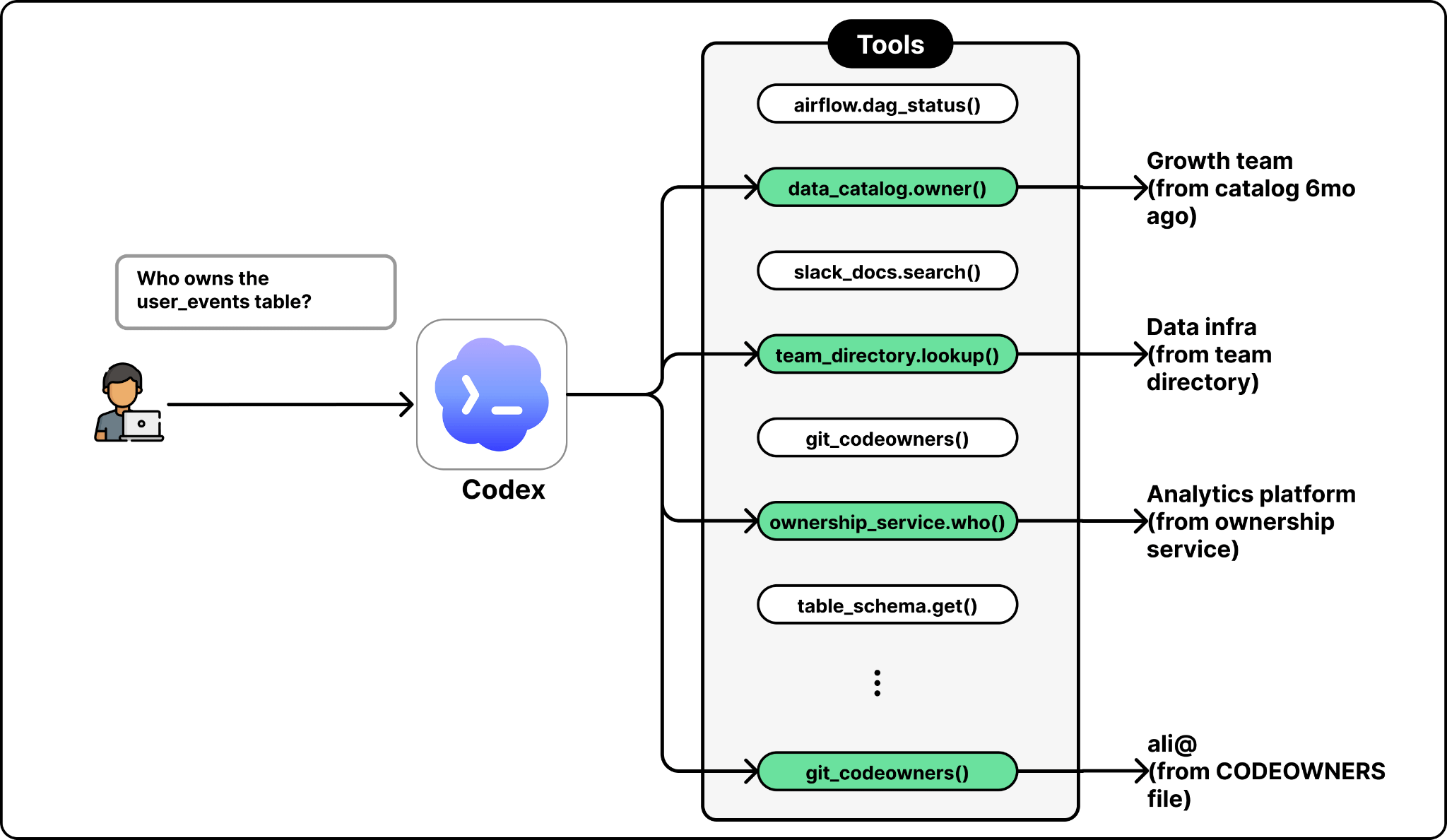
Capping the agent at around 13 tools per call, and removing overlapping ones, fixed the problem. The lesson is that an agent does not need access to every system in the company. It needs access to the right ones, with no two tools doing the same job.
In practice, that means avoiding overlap. If two metadata services expose similar information, the agent should only see one. If two ways exist to look up table ownership, pick one. The model is better at reasoning than at choosing between near-duplicate tools.
A natural first instinct for a data agent is to embed all historical queries and use them as context. OpenAI tried this approach, and it did not work. Most queries in any company are exploratory one-offs, not canonical examples of how a table should be used.
The team improved results by ranking past queries by how trustworthy they are. The agent learns from queries the company has already written, but not all of them are worth imitating. Queries behind heavily used dashboards, usually written by data scientists, rank highest, because they tend to be correct and reused often. One-off queries written for a single analysis and never run again rank lowest. Once the team ranked queries this way, the model started copying the good patterns instead of the bad ones.
The general lesson is that retrieval quality depends on the quality of what you retrieve. What you feed into retrieval is what you get back from it.
Prescriptive prompts hurt the agent’s results. The team experimented with detailed step-by-step instructions about how the agent should approach each kind of question. The agent followed the instructions and produced worse answers. High-level guidance worked better. Tell the model what the goal is. Let it reason about how to get there. Give it the right context and the right tools, and trust the reasoning.
This matches what other teams building agents have found. Modern models are good at planning when they have good information. They are less good at being told what to plan.
The cross-cloud migration was supposed to be impossible in months. The team’s initial estimate was longer. Emma pushed for two months because the company was running out of capacity and a longer timeline was not an option. The team hit the deadline. Comparable migrations at other companies can take years.
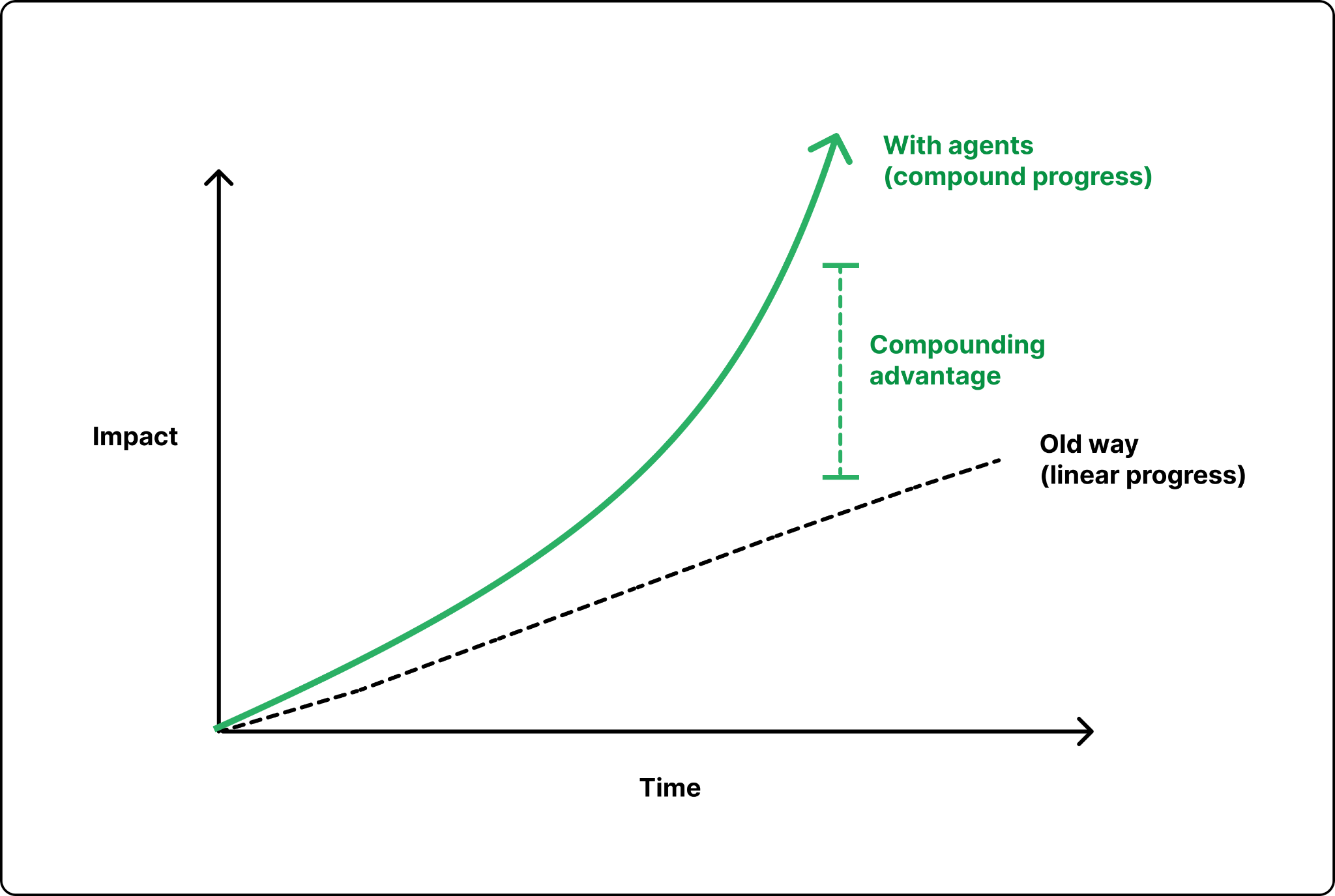
The takeaway the team came away with is that timeline estimates from before Codex no longer apply. If a project sounds like it should take a year, the right question is whether it could be done in a quarter with an agent doing most of the work. The bigger risk is not over-promising; it’s playing it safe. A team that sticks to old timelines never finds out what the new tools make possible.
The data agent and the internal Codex use cases are not the end of the story. Emma says two things sit on the team’s near horizon: custom apps, and platforms keeping pace with users.
Custom apps generated per question.
Most analytics tools today give users a fixed set of widgets, like bar charts, line charts, and pivot tables. They are useful, but limited. If your question does not fit the available widgets, you have to write a custom script or file a request with the data team.
OpenAI wants to go further. The agent already builds traditional dashboards on demand, but the next step is freeform ones. Instead of a chart, Codex would build a full React app connected to a backing store and tailored to the exact question asked. Each one takes seconds to build, fits a single user’s need, and runs on real data with real guardrails.
When this rolls out, users will no longer pick from a fixed set of widgets. They will describe what they want and the app will appear, generated per question. A marketer who wants to explore campaign performance with a custom filter and a tailored layout will simply ask.
Users move faster than platforms can keep up.
The same Codex that powers the data agent has accelerated every team at OpenAI. Frontend engineers vibe-code new UIs in a morning. Researchers spin up custom pipelines on demand. Platform teams cannot move at that speed safely. A bad UI affects a few users, but a bad change to shared infrastructure can take the whole company offline.
This leads to a mismatch. Users now ship code to the platform faster than the team can review and validate it, and some of that code is written by people who do not fully understand what it does. Emma described examples like when a bad Flink job lands on the cluster and brings it down, upon asking the user replies, “I don’t know, I don’t know how Flink works, it’s vibe-coded. Can you help fix it?”
This is the next problem the data platform team plans to work on. The fix will not be another user-facing agent, but agents on the platform side, designed to triage incoming code, validate it before it runs, and absorb the deluge from AI-amplified users. The previous wave of agents helped users do more. The next wave will help platforms keep up.
[ad_2]
Source link
More on how openai built its data agent
Stay tuned for updates on how openai built its data agent as the story develops. Related: Optimized inference you actually own.
Frequently Asked Questions
OpenAI's data platform stores 1.5 exabytes across 90,000 datasets and serves about 4,000 internal users as of May 2026. The team has scaled it through enormous growth over the last two years.
At this scale, the hardest part of data analysis is not writing SQL. It is finding the right tables to use and understanding semantically how to use them, since many tables look similar but mean different things, including the grain of each table and how to join them.
The basic pattern is an LLM plus a harness: the LLM provides the reasoning, and the harness provides the tools and the agentic loop. Users ask questions in plain English in Slack, a web portal, their IDE, or the Codex CLI through MCP, and the agent figures out the relevant tables, writes and runs SQL, checks the result, and returns the answer with its reasoning attached.
The same investment in Codex that powers the agent let the team migrate thousands of DAGs, 90,000 tables, and 600 petabytes between clouds in two months. Three real Codex use cases include the cross-cloud migration, hands-off open-source patching, and automated support triage.