Mishaal Rahman / Android Authority
I’ve always liked the idea of Samsung DeX more than the thought of actually using it. Turning a phone into a desktop computer sounds incredibly cool, but to me, it always felt like one of those features designed to impress people during demos rather than something you could actually count on every day.
So naturally, I decided to do the dumb thing and use Samsung DeX as my only computer for a week. I ditched my laptop and worked with nothing but my Galaxy S26, a monitor, and a handful of accessories. I expected frustration and maybe a little regret, too. Instead, I ended up having way more fun than I anticipated.
Could you replace your laptop with Samsung DeX for a week?
1 votes
Samsung DeX is good enough for most things I need

Pankil Shah / Android Authority
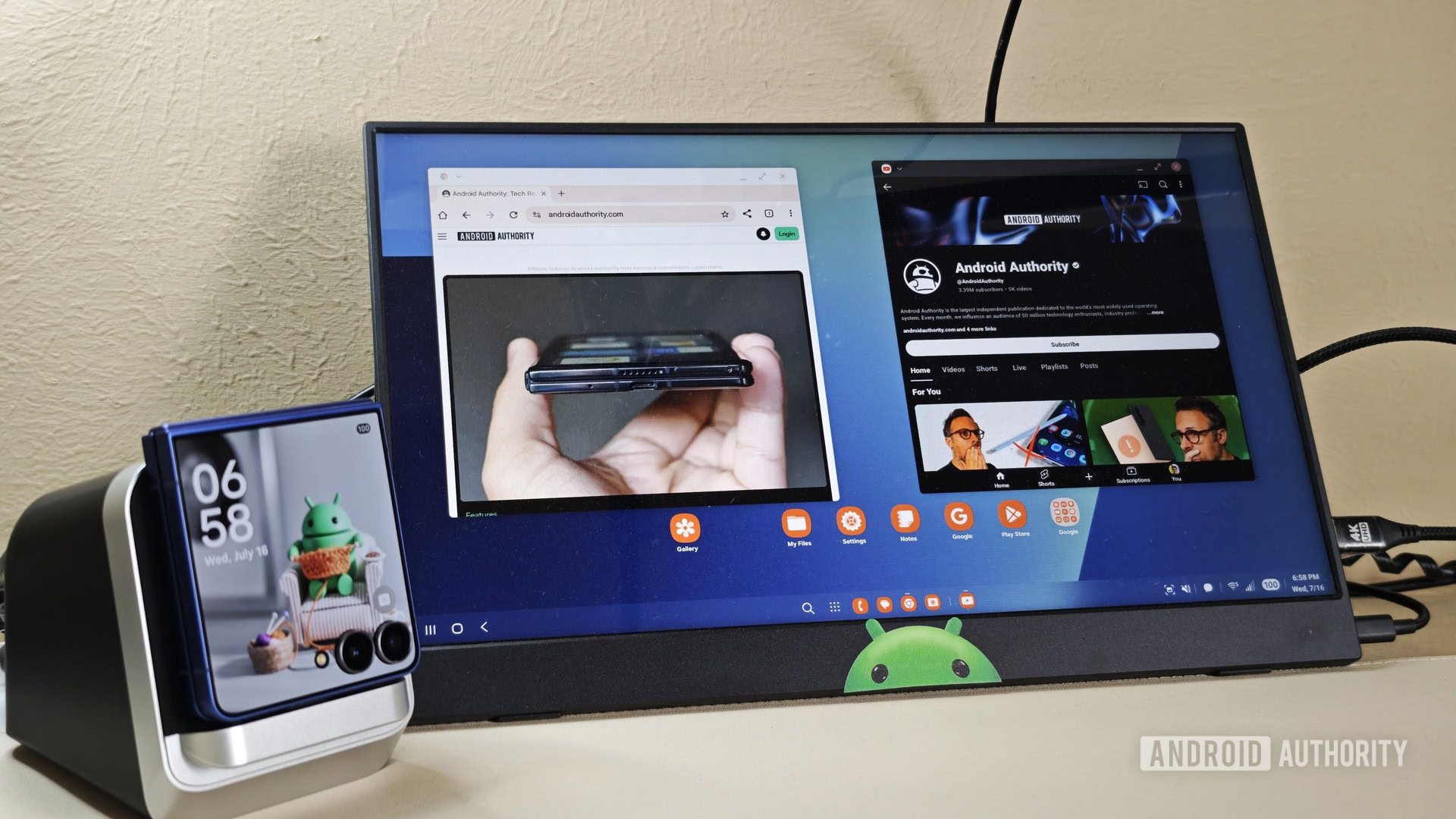
Having spent a week with Samsung DeX, I can tell you that the experience isn’t all that different from using a regular PC. There’s a taskbar for switching between apps and managing quick settings, a launcher menu for opening apps, and a desktop that can be customized with widgets. DeX also supports window snapping, so you can snap apps to the left or right side of the screen — something I do all the time on my Windows laptop while multitasking.
What I liked most about DeX, though, is that I don’t have to deal with the usual syncing headaches that come with switching between devices. Since it’s essentially the same phone powering everything, all my apps, files, photos, accounts, and even browser tabs are already there when I switch to work mode.
The only thing I consistently missed while using Samsung DeX was my browser extensions.
Being a writer, most of my work happens inside a browser, so I rarely feel limited with Samsung DeX. Writing, researching, editing documents, managing tabs, and even hopping between Slack and email all worked quite well. At times, I almost forgot I was using my phone instead of a traditional PC. The only thing I consistently missed was my browser extensions. My favorite browser — Brave — doesn’t support extensions on Android, so I ended up missing Grammarly, Bitwarden, and a couple of other add-ons I normally rely on. It was one of those things that reminded me that this is still Android underneath.
But beyond that, DeX handled almost everything I’d normally do on my laptop. For writing, browser-based work, and other everyday tasks, I didn’t really miss my PC that much. In fact, it was quite pleasant to use my S26’s front camera for work calls instead of a 1080p webcam.
Also, since Samsung DeX is essentially an extension of my phone, I can still make and receive calls, reply to text messages, check notifications, and use all my apps on a larger screen. And honestly, that seamless continuity was the best part of the whole experience.
DeX nails the desktop basics while staying incredibly flexible

When I first tried DeX, I did it without any accessories to see how usable it was. Honestly, I expected it to feel awkward, but Samsung deserves some credit for making the phone-as-a-touchpad feature far better than it sounds on paper.
DeX supports many of the same gestures I’m already used to on my Windows laptop, including two-finger tap for right-clicking, pinch-to-zoom, three-finger swipe down to minimize apps, and three-finger swipe left or right to switch between apps. Sadly, using the phone as a touchpad wasn’t practical for me, since I planned to use DeX for long hours. But yes, for quick sessions when you don’t want to connect a keyboard and mouse, it works great.
Speaking of keyboards, DeX also supports many familiar Windows keyboard shortcuts. Alt + Tab switches between apps, Alt + F4 closes the current app, Win + N opens the notification panel, and Win + L locks DeX. Between the recognizable One UI design, desktop-style multitasking, touchpad gestures, and proper keyboard shortcut support, the learning curve was almost nonexistent.
What really sold me on the experience, though, was the flexibility. I could run DeX wired or wirelessly, connect it to a monitor or TV, and use it with or without dedicated peripherals, depending on where I’m working and what I want to do.
The cracks start to show once you push DeX harder

Pankil Shah / Android Authority
The biggest issue, I’d say, was occasional slowdowns while multitasking. On my PC, I’m used to leaving dozens of browser tabs and apps open without really thinking about it. But with Samsung DeX, I had to be a little more mindful. Once I started piling on too many tabs and switching between apps, I could notice occasional stutters and slowdowns.
With DeX, you’re simply replacing a laptop with a bag of accessories.
Another thing that bothered me was the app experience. Inside DeX, you’re essentially using scaled-up versions of Android apps that are designed for touch input rather than a keyboard and mouse. And that means apps don’t always behave the way you’d expect on a traditional PC. For instance, when using Slack on my PC, I’m used to seeing my channels and DMs on the left side while conversations appear on the right. In DeX, though, Slack is just a stretched-out phone app. Meanwhile, apps like WhatsApp look almost identical to their desktop counterparts. That inconsistency is enough to remind you that you’re not using an actual desktop.
Finally, there’s the portability aspect. One of the things I was most excited about before replacing my laptop with Samsung DeX was the idea of traveling lighter. In theory, carrying just a phone instead of a laptop sounded amazing. But realistically, if you actually want to work comfortably on the go, you still need a bunch of accessories like a keyboard, mouse, USB-C hub, and maybe even a stand. Of course, none of this is a problem when working from home or an office, but while traveling, you’re simply replacing a laptop with a bag of accessories.
Samsung DeX is impressive, but it’s not for everyone

Adam Birney / Android Authority
After spending an entire week working from Samsung DeX, I walked away with two very different thoughts in my head at the same time. The first is that, no, DeX still is not a true laptop replacement for everyone. But the second — and perhaps more surprising — realization is just how close it actually gets.
Of course, the limitations are there. But Samsung DeX is no gimmick either. In fact, for me, and probably a lot of people whose work doesn’t involve Adobe apps, programming, massive spreadsheets, or multi-monitor setups, Samsung DeX is more than good enough. And honestly, that still feels kind of wild to say.
Don’t want to miss the best from Android Authority?


Thank you for being part of our community. Read our Comment Policy before posting.
[ad_2]
Source link
More on replaced my computer with the galaxy
Stay tuned for updates on replaced my computer with the galaxy as the story develops. Related: Built-in (Useful) AI & Lots of New Core Functionality—Stephen Wolfram Writings.
Frequently Asked Questions
For a week-long test with the Galaxy S26, yes for most things — writing, browsing, Slack, email, and calls all worked well; the author almost forgot it was a phone.
Missing browser extensions — Brave on Android does not support them, so no Grammarly or Bitwarden.
Taskbar, launcher menu, customizable desktop, window snapping, touchpad gestures (two-finger right-click, pinch-zoom, three-finger swipes), and Windows-style keyboard shortcuts (Alt+Tab, Alt+F4, Win+L).
Seamless continuity — same apps, files, photos, accounts, and browser tabs, plus calls and texts on a bigger screen; the S26's front camera beat a 1080p webcam for work calls.