Andy Walker / Android Authority
It’s no secret that Android apps can and often do track users as they navigate their devices and the internet. This is done through systems that monitor users’ habits and report various parameters to third parties, whether that data is as innocuous as how a particular button is used or more consequential, such as location or other personal details.
How concerned are you about trackers in Android apps?
432 votes
While tracking itself isn’t necessarily a problem, I don’t want trackers shadowing me, so I try to block these as broadly as possible. But just how many apps are engaging in this activity on my phone?
I recently used Exodus to highlight trackers in a popular Android launcher, but I didn’t realize just how widespread the problem is across apps I use almost every day.
What is Exodus, and how does it work?

Andy Walker / Android Authority
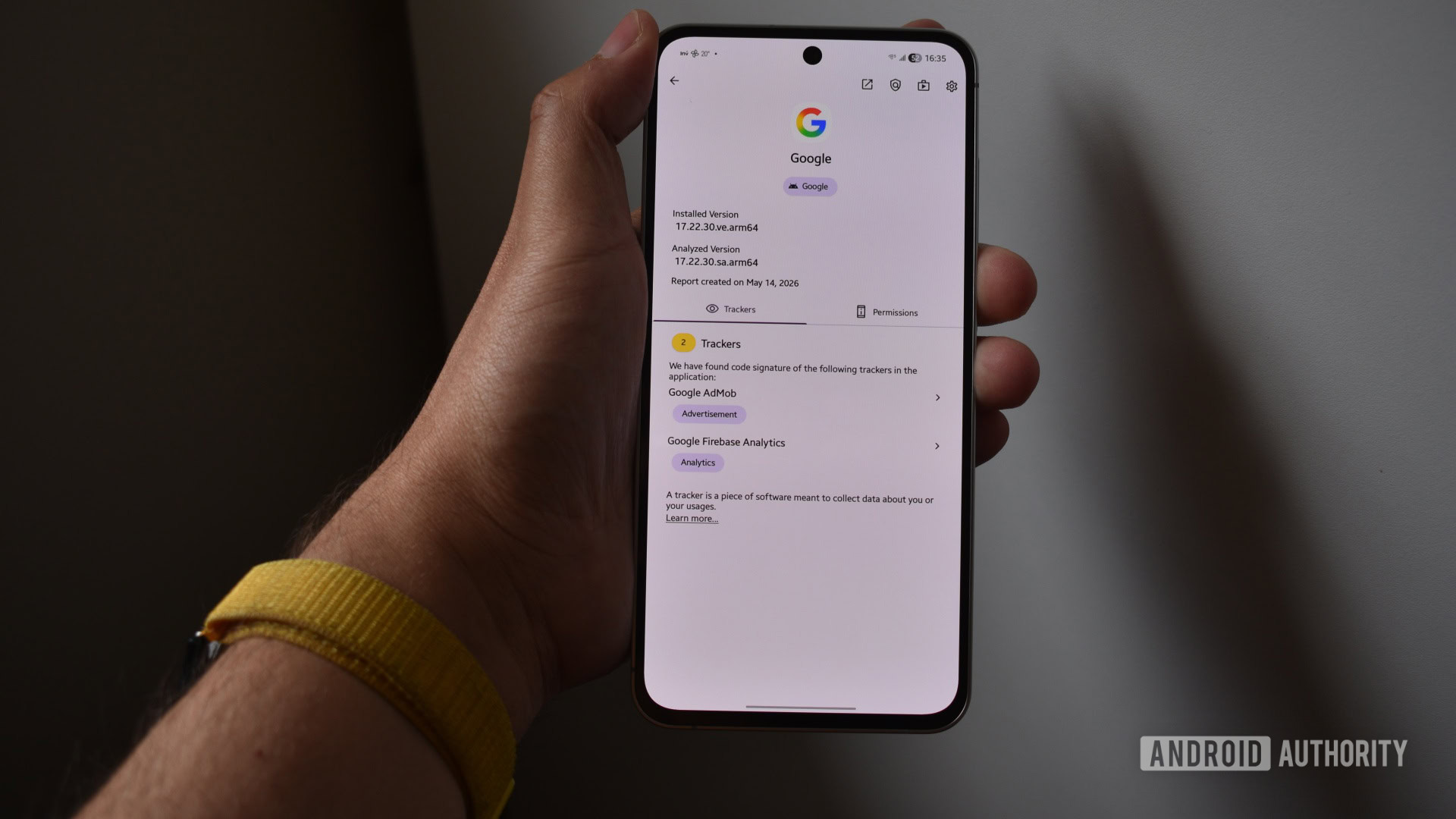
Exodus is an open-source app that highlights the tracking and analytics libraries hidden within apps installed on my device. It’s built and maintained by the French non-profit Exodus Privacy, a group of “hacktivists who want to protect privacy everywhere.”
So, how does it work? After installing the app, Exodus scans the trackers and permissions lurking within each app. On my phone, with around 100 apps installed, this takes about three minutes.
Once it’s complete, you can filter apps by name, number of trackers or permissions, or installation date, or search for individual apps. I suggest using the middle two options — they’ll certainly provide the biggest scare.
Patching my Android privacy quilt, one square at a time

Andy Walker / Android Authority
While the sheer number of trackers hidden within an app doesn’t make it insecure or disrespectful of your privacy, it does give it the tools it needs. However, it is important to indicate that not all trackers are made the same.
Some trackers are primarily focused on reporting crashes and bugs to developers who are keen to fix any problems in their software. Others are key to identifying and profiling them, and subsequently serve them advertisements.
Exodus’s real power lies in revealing the secrets that privacy-respecting apps appear to hide.
Exodus has helped me sniff out and block the trackers I don’t trust using third-party ad-blocking tools like NextDNS and Blokada. With the latter, I can easily tap any domains tied to a particular tracker — Exodus highlights them when you tap them — and mark them for blocking. This helps plug any gaps that a general blocklist might have. It also means that you can let developers see pertinent app-use information without sacrificing your personal info to the profiling gods.

Andy Walker / Android Authority
However, Exodus’s real power lies in revealing the secrets that privacy-respecting apps appear to hide. Would you believe that the sports scoring app you use almost daily packs nearly 30 trackers? What about your investment app? Shopping app? Favorite launcher?
Perhaps it’s time to find alternatives that focus on safeguarding your identity. You can choose to live with trackers, block them, or find suitable alternatives.
One of the best examples of this process in action, at least for me, involved fan-favorite Nova Launcher. After its recent purchase, newer versions of the app now include additional trackers that weren’t present in prior builds. This spooked me in particular, but it allowed me to take measures to stop Nova from following me around my phone or uninstall it and move on to another launcher.
Even the best Android privacy apps have blind spots

Andy Walker / Android Authority
Exodus has become a must-install app on my phone, but importantly, it could not identify every app installed on it.
Although the list of unanalyzed apps includes plenty of open-source, locally-built, and manufacturer-made apps, you will have some blind spots with Exodus. In these cases, it’s a good idea to use a secondary app like TrackerControl to fill the gaps. It also doubles as a tracker-blocking tool, making it a useful one-stop solution for the shadowing issue.
I also want to highlight that not everyone will have a problem with trackers. If you aren’t bothered by companies siphoning off your information, you don’t need to scan apps for trackers. Sure, it might still be interesting to see which apps harbor which tracker libraries, but you’re free to use your phone as you want, including not blocking trackers or the ads they serve.
Exodus has taught me that Android apps aren’t quite what they seem on the surface. While some are as altruistic as they appear, others hide loads of potential personal data monitors and ad-serving libraries beneath their skin. Exodus helps uncover this information and allows me to respond as I see fit. While you certainly don’t need to follow in my footsteps, you might find it worthwhile to try Exodus if you value your privacy or just want to see how many trackers your favorite Android app is hiding.
Don’t want to miss the best from Android Authority?


Thank you for being part of our community. Read our Comment Policy before posting.
[ad_2]
Source link
More on android apps hide dozens of trackers
Stay tuned for updates on android apps hide dozens of trackers as the story develops. Related: Android 17 stable update is rolling out to Pixel phones.
Frequently Asked Questions
Exodus is an open-source app built by the French non-profit Exodus Privacy that reveals the tracking and analytics libraries hidden inside the apps installed on your device.
After installing, Exodus scans the trackers and permissions in each app, which takes about three minutes on a phone with around 100 apps, and lets you filter by name, tracker count, permissions, or install date.
On a recent Android Authority poll, 46% said they were very concerned and actively avoid apps with trackers, while another 44% were somewhat concerned and try to limit their use of such apps.
The author used Exodus to identify tracker domains and then blocked them with tools like NextDNS and Blokada, for example after newer versions of Nova Launcher added trackers following its purchase.