
Datasette Apps: Host custom HTML applications inside Datasette
18th June 2026
Today we launched a new plugin for Datasette, datasette-apps, with this launch announcement post on the Datasette project blog. That post has the what, but I’m going to expand on that a little bit here to provide the why.
The TL;DR
Datasette Apps are self-contained HTML+JavaScript applications that run in a tightly constrained <iframe> sandbox hosted on your Datasette application. They can use JavaScript to run read-only SQL queries against data in Datasette, and can run write queries too if you configure them with some stored queries.
Here’s a very simple example and a more complex custom timeline example—the latter looks like this:
Apps are allowed to run JavaScript and render HTML and CSS. They are limited in terms of access—the <iframe sandbox="allow-scripts allow-forms"> they run in prevents them from accessing cookies or localStorage and they also have an injected CSP header (thanks to this research) which prevents them from making HTTP requests to outside hosts, preventing a malicious or buggy app from exfiltrating private data.
Datasette Apps started out as my attempt at building a Claude Artifacts mechanism for Datasette Agent, but I quickly realised that the sandboxed pattern is interesting for way more than just adding custom apps to the interface surface and promoted it to its own top-level concept within the Datasette ecosystem.
They’re also a fun way to turn my multi-year experiment in vibe-coded HTML tools into a core feature of my main project!
You can try out Datasette Apps by signing in with GitHub to the agent.datasette.io demo instance.
Why build this?
Since the very first release, Datasette has offered a flexible backend for creating custom HTML apps via its JSON API.
One of my earliest Datasette projects was an internal search engine for documentation when I worked at Eventbrite—it worked by importing documents from different systems into SQLite on a cron and then serving them through a Datasette instance with a custom HTML+JavaScript search interface that directly queried the Datasette API.
I had client-side JavaScript constructing SQL queries, which originally was intended as an engineering joke but turned out to be a really productive way of iterating on the app!
That project, combined with my experience building my HTML tools collection and my experiments with Claude Artifacts, has convinced me that adding a Datasette-style backend to a self-contained HTML frontend is an astonishingly powerful combination.
Imagine how much more useful Claude Artifacts could be if they had access to a persistent relational database. That’s what I’m building with Datasette Apps!
Neat ideas in Datasette Apps
Here are a few of the ideas and patterns I’ve figured out building this which I think have staying power.
<iframe sandbox="allow-scripts" srcdoc="..."> + <meta http-equiv="Content-Security-Policy" content="default-src 'none'; script-src 'unsafe-inline'; style-src 'unsafe-inline'; img-src data: blob:;">
This is the magic combination that makes Datasette Apps feasible in the first place. I need to run untrusted HTML and JavaScript on a highly sensitive domain—an authenticated Datasette instance can contain all sorts of private data. The sandbox= attribute lets me run that untrusted code in a way that cannot interact with the parent application—it can’t read the DOM, or access cookies, or steal secrets from localStorage. It can however use fetch() and friends to load content (or exfiltrate data) from other domains. But… it turns out if you start an HTML page with a <meta http-equiv="Content-Security-Policy"> header you can set additional policies that lock down access to other domains. I was worried that malicious JavaScript would be able to update or remove that header but it turns out that doesn’t work—once set, the CSP policy is immutable for the content of that frame.
Locked down APIs with postMessage() and MessageChannel()
Having locked down those iframes to the point that they couldn’t do anything interesting at all, the challenge was to open them back again such that they could run an allow-list of operations, starting with read-only SQL queries against specified databases.
I built the first version of this with postMessage(), which allows a child iframe to send messages to the parent window. I created a simple protocol for requesting that the parent run a SQL query—the parent could then verify it was against an allow-listed database before executing it.
One of the LLM tools, I think it was GPT-5.5, suggested that postMessage() on its own can be exploited if the iframe somehow loads additional code from an untrusted domain. I don’t think that applies to Datasette Apps, but I also believe in defense in depth, so I had GPT-5.5 help me port to a MessageChannel() based transport instead.
MessageChannel() has the advantage that if a page navigates to somewhere else the channel closes automatically, removing any chance of executing commands sent from an untrusted external page.
Visible logs, for queries and errors
If you navigate to the timeline demo and search for the string usercontent you’ll pull in some search results that embed images from the user-images.githubusercontent.com domain. This domain is not in the CSP allow-list, so it trips an error.
Those errors are captured and transmitted back to the parent frame, where they can be displayed in a useful error log. This is meant to make hacking on apps more productive by surfacing otherwise-invisible problems.
I built an experiment demonstrating that you can even turn this into a one-click-to-allow mechanism for building the CSP allow-list based on what breaks, but I haven’t integrated that idea into datasette-apps just yet.
SQL queries are also visibly logged—scroll to the bottom of the timeline page to see that in action.
Stored queries for write operations
I want apps to be able to conditionally write to the database, but this is an even more dangerous proposition than SQL reads!
My solution involves Datasette’s stored queries feature, rebranded from “canned queries” and given a major upgrade in the recent Datasette 1.0a31—work that was directly inspired by Datasette Apps.
Users can create a stored write query that performs an insert or update, then allow-list that specific query for an app to use. Usage from code inside an app looks like this:
const result = await datasette.storedQuery("todos", "add_todo", {
  title: "Buy milk",
  due_date: "2026-06-20",
  priority: "high",
  completed: false
});
I’m only just beginning to explore the possibilities this unlocks myself, but my goal is to support full read-write applications built safely as Datasette Apps.
Copy and paste a prompt to build an app
The Datasette Apps plugin has no dependency on LLMs at all, but these self-contained apps are the perfect shape to be written by a modern LLM.
The create app form includes a copyable prompt at the end. This prompt has everything a model needs to know to build a new app, including the schema of any selected databases.
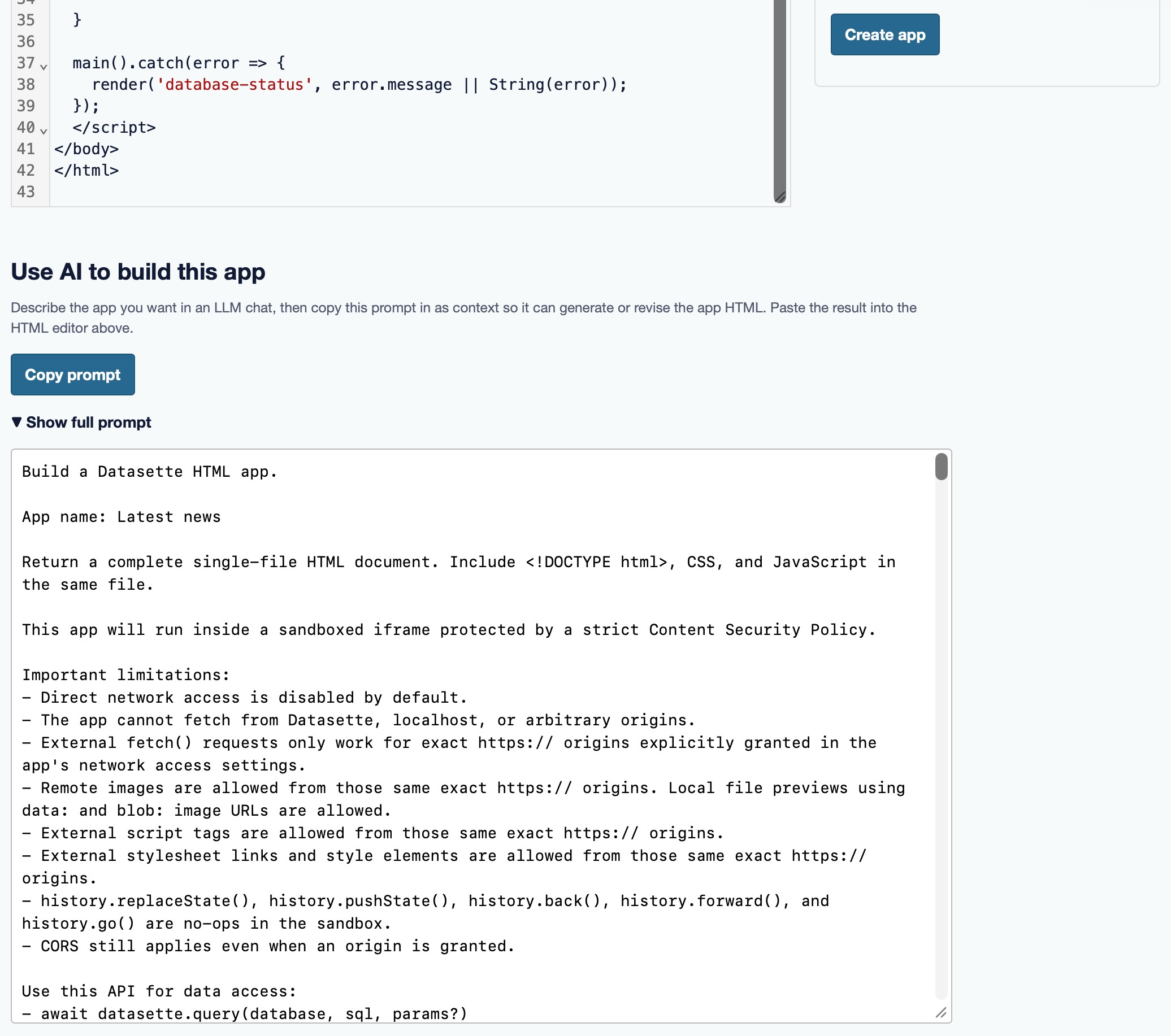
This means you can click “copy”, paste it into ChatGPT or Claude or Gemini, tell it what you need, and there’s a good chance the model will spit out the code necessary to build the app.
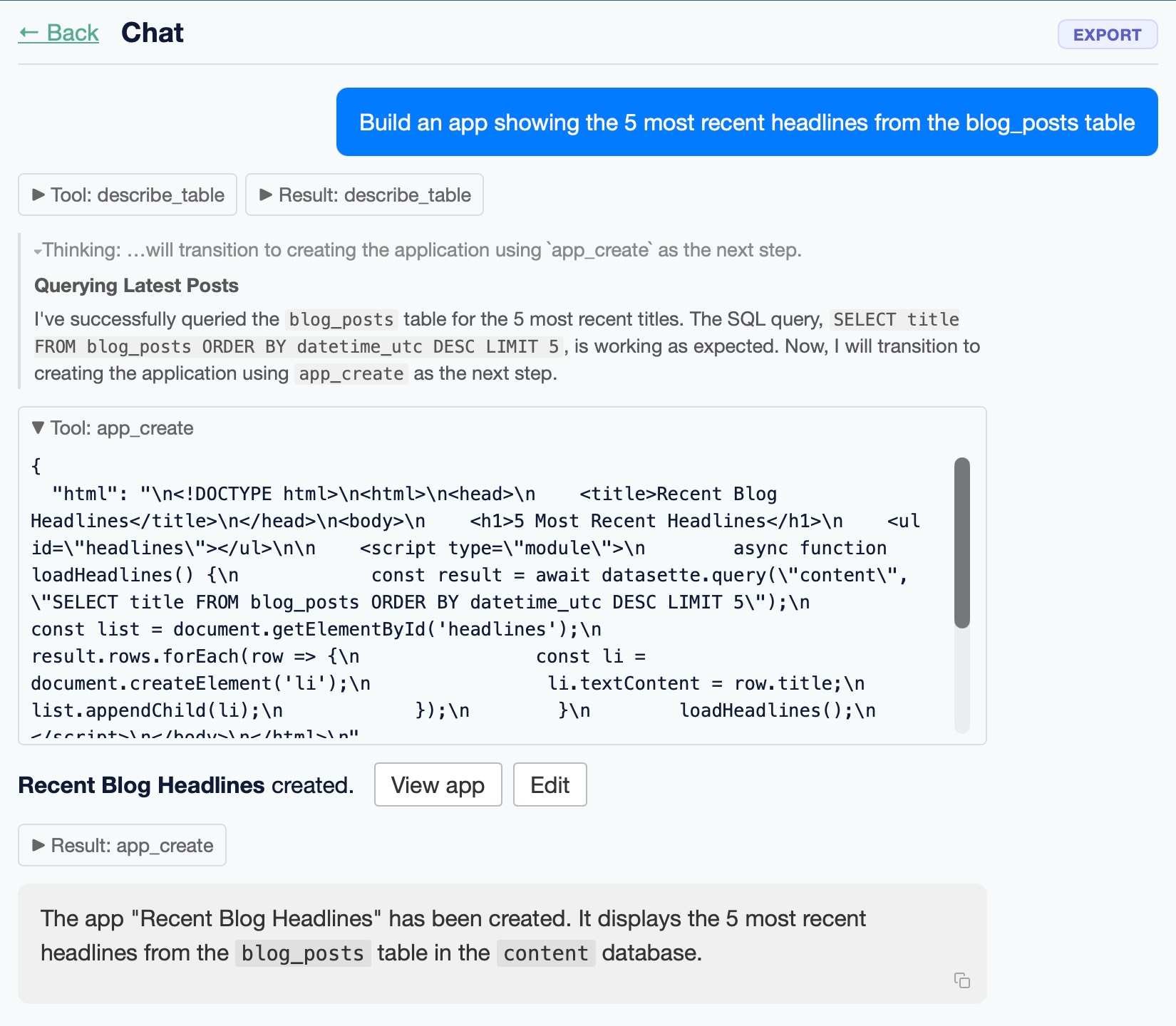
If you have Datasette Agent installed your AI assistant will also gain tools to both create new apps and edit existing ones, Claude Artifacts style.
Built with so much AI assistance
Datasette Apps started life back in April as datasette-agent-artifacts, a plugin I have since renamed to datasette-agent-edit keeping only its editing tools. I built that as one of the first plugins for Datasette Agent, to help get the plugin hooks into the right shape. That first prototype was mainly built using Claude Opus 4.6 in Claude Code.
When I switched track to Datasette Apps I started with a plan constructed using Codex Desktop and GPT-5.5 xhigh, based on extensive dialog and feeding in both datasette-agent-artifacts and other prototypes I had built.
Most of the work that followed stuck with Codex, but in the few short days that we had access to Claude Fable 5 I had it run a security evaluation of the product (an ability that would get it banned by the US government shortly afterwards) and it found a very real problem.
I was allowing users to allow-list CSP hosts for their apps, but Fable pointed out the following attack:
- A less privileged user with
create-apppermission creates an app that queries SQLite for all available tables and selects and exfiltrates all of the data to a host they had allow-listed via CSP. - They then trick an administrator user with access to private data into visiting their app.
- … and the app can now run queries as that user and steal their private data!
That’s clearly unacceptable. I fixed it by restricting the ability to allow-list any domain to a new apps-set-csp permission, which is intended just for trusted staff. Site administrators can also configure Datasette with a list of allowed_csp_origins, which regular users can then select. This means you can do things like allow cdnjs.cloudflare.com and your users will be able to build apps that load extra JavaScript libraries from the cdnjs CDN.
I’ve reviewed Datasette Apps extremely closely, especially the security-adjacent parts of it. The critical sandbox and CSP configuration are based on multiple AI-assisted prototypes and tests.
It’s looking good so far
I’m really pleased with this initial release.
Datasette is growing beyond its origins as an application for serving read-only data into a much richer ecosystem of tools for doing useful things with that data once it has been collected.
Datasette’s roots are in data journalism. I’ve always been interested in the question of what comes next after a journalist gets their hands on a giant dump of data about the world. Datasette supports exploring and publishing it. Datasette Agent adds interrogating it with AI assistance. Now Datasette Apps expands that to building custom interfaces and visualizations to help unlock the stories that are hidden within.
[ad_2]
Source link
More on host custom html applications inside datasette
Stay tuned for updates on host custom html applications inside datasette as the story develops. Related: ‘It’s quite a bit more than we expected’: Satellite reveals immense scale of GPS signal tampering.
Frequently Asked Questions
Datasette Apps are self-contained HTML+JavaScript applications that run in a tightly constrained iframe sandbox hosted on your Datasette application. They can use JavaScript to run read-only SQL queries against data in Datasette, and write queries too if configured with stored queries.
They run in an iframe sandbox (allow-scripts allow-forms) that prevents access to cookies or localStorage, plus an injected CSP header that blocks HTTP requests to outside hosts, preventing a malicious or buggy app from exfiltrating private data.
They started as an attempt at building a Claude Artifacts mechanism for Datasette Agent, but the sandboxed pattern proved interesting for more than adding custom apps, so it was promoted to a top-level concept. It also turns the author's multi-year experiment in vibe-coded HTML tools into a core feature.
You can try them by signing in with GitHub to the agent.datasette.io demo instance. The plugin launched June 18, 2026.



2 thoughts on “Host custom HTML applications inside Datasette”