TL;DR
- Google has introduced new “Wear Widgets” in Wear OS 7 as part of a broader push to unify widgets across Android devices.
- The new widgets appear to be the long-term successor to Wear OS Tiles, though Google says Tiles will continue to be supported for now.
- Some Reddit users aren’t thrilled with the change, arguing that rectangular widgets squeezed into round watch displays look worse than the current full-screen Tiles.
Google has officially introduced Wear Widgets with Wear OS 7, and while the company isn’t outright killing Tiles yet, the writing is clearly on the wall.
Don’t want to miss the best from Android Authority?


In a developer blog, Google described Wear Widgets as “the next step in the evolution of Tiles.” The new system will make widgets work more consistently across Android phones, tablets, cars, and now smartwatches.
In simple terms, Google wants developers to build a single widget system that scales across the entire Android ecosystem rather than creating separate experiences for Wear OS watches.
Wear Widgets or Tiles, which one would you prefer on your Wear OS smartwatch?
1 votes
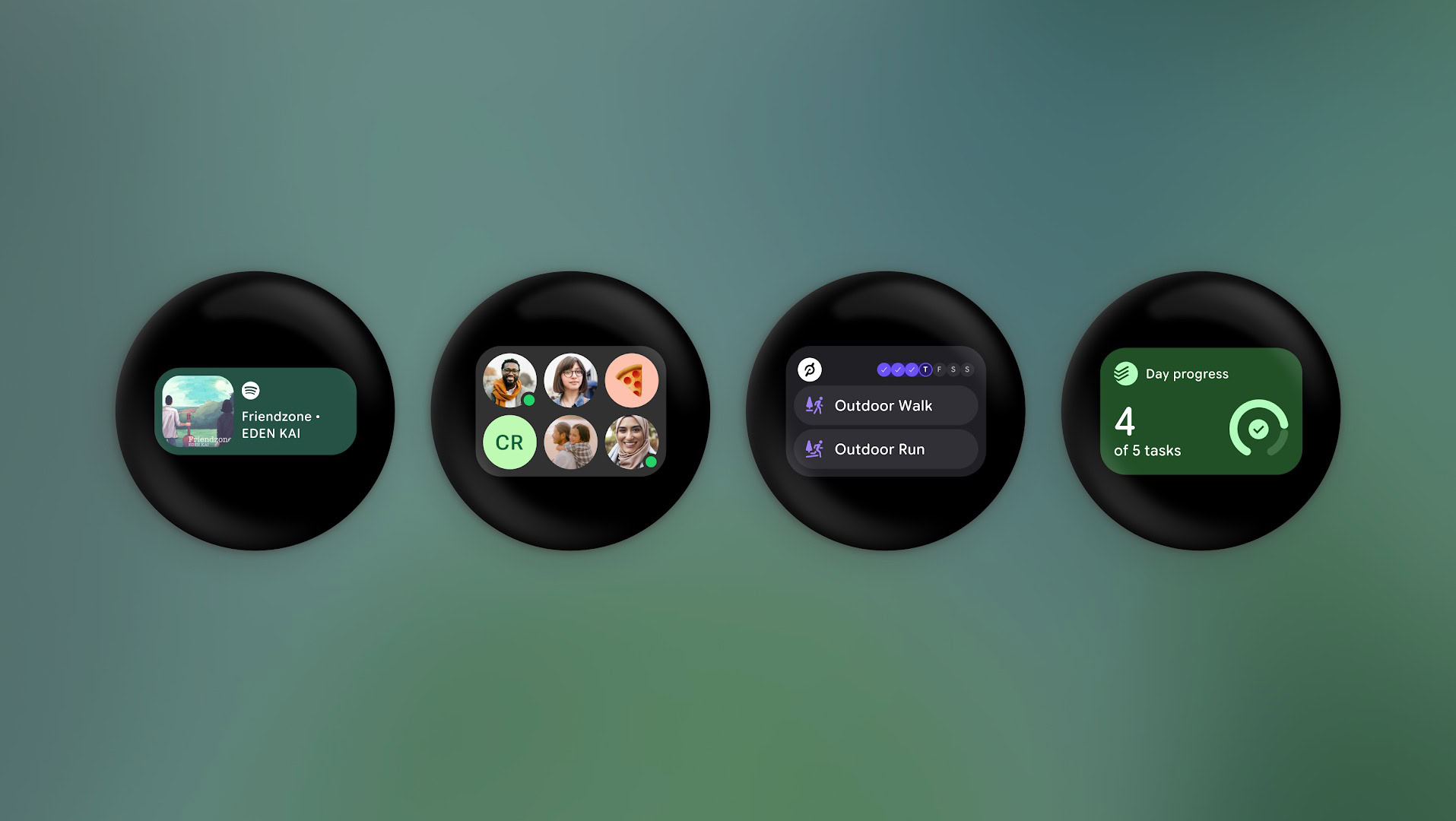
The new Wear Widgets come in small and large layouts that align with the same 2×1 and 2×2 widget formats used on Android phones. Google says this should make it easier for developers to adapt existing Android widgets for Wear OS instead of building dedicated Tiles from scratch.
The images below show how you’ll be able to add Wear Widgets on Wear OS 7. We captured them using the Wear OS 7 emulator.
While the widget system is good news for developers, not everyone seems convinced it’s good news for smartwatch users.
Over on Reddit, reactions to the new widget system have been pretty mixed. Many users feel the new rectangular card-like layouts look awkward on circular watch displays and lack the polished feel of current full-screen Tiles.
“Rectangular widgets shrunken down to fit into a round display? Seems like a UI downgrade from Tiles,” commented one user, while another concurred and said, “Why can’t they make the widgets, you know, round?”
Others also questioned whether replacing full-screen Tiles with smaller widgets would actually improve the Wear OS experience. “Dropping tiles entirely and replacing with widgets seems like a bad call. The Weather tile, for example, is great. I can jump in and out of whatever section I tap on. Widgets look like a step backwards and a waste of valuable screen space if they don’t fill it like tiles do,” wrote another user.
Some users also pointed out that Google spent years redesigning Wear OS around circular displays, especially with Wear OS 6’s Material 3 Expressive overhaul, so making the shift toward rectangular widgets feels somewhat contradictory.
Thankfully for existing Wear OS users, Tiles aren’t disappearing immediately. Google says it will continue supporting the tools developers use to build Tiles “for some time,” while also releasing updated versions with new features.
Those updates include faster-loading Tiles and simplified Material 3 development tools.
Interestingly, Google is also adding something called Dynamic Service Switching for Tiles in Wear OS 7. From Google’s description, it could let apps automatically switch between different versions of the same Tile depending on the situation.
So while Wear Widgets appear to be the future, Tiles still have plenty of fans, and for now, it looks like both systems will coexist.
Thank you for being part of our community. Read our Comment Policy before posting.
[ad_2]
Source link
More on wear os 7 brings new widgets
Stay tuned for updates on wear os 7 brings new widgets as the story develops. Related: Wear OS 7 is now available for eligible Pixel Watch.
Frequently Asked Questions
Google has introduced Wear Widgets in Wear OS 7 as part of a broader push to unify widgets across Android devices. In a developer blog, Google described them as the next step in the evolution of Tiles.
Google is not outright killing Tiles yet, and they will continue to be supported for now. However, Wear Widgets appear to be the long-term successor, so the writing is clearly on the wall.
Google wants developers to build a single widget system that scales across the entire Android ecosystem, phones, tablets, cars, and watches, rather than creating separate experiences for Wear OS watches. The widgets come in small and large 2×1 and 2×2 layouts matching Android phone widgets.
Some Reddit users are not thrilled, arguing that rectangular widgets squeezed into round watch displays look worse than the current full-screen Tiles.